
Three bugs killed my agent build. The visual workflow builder didn’t stop any of them.
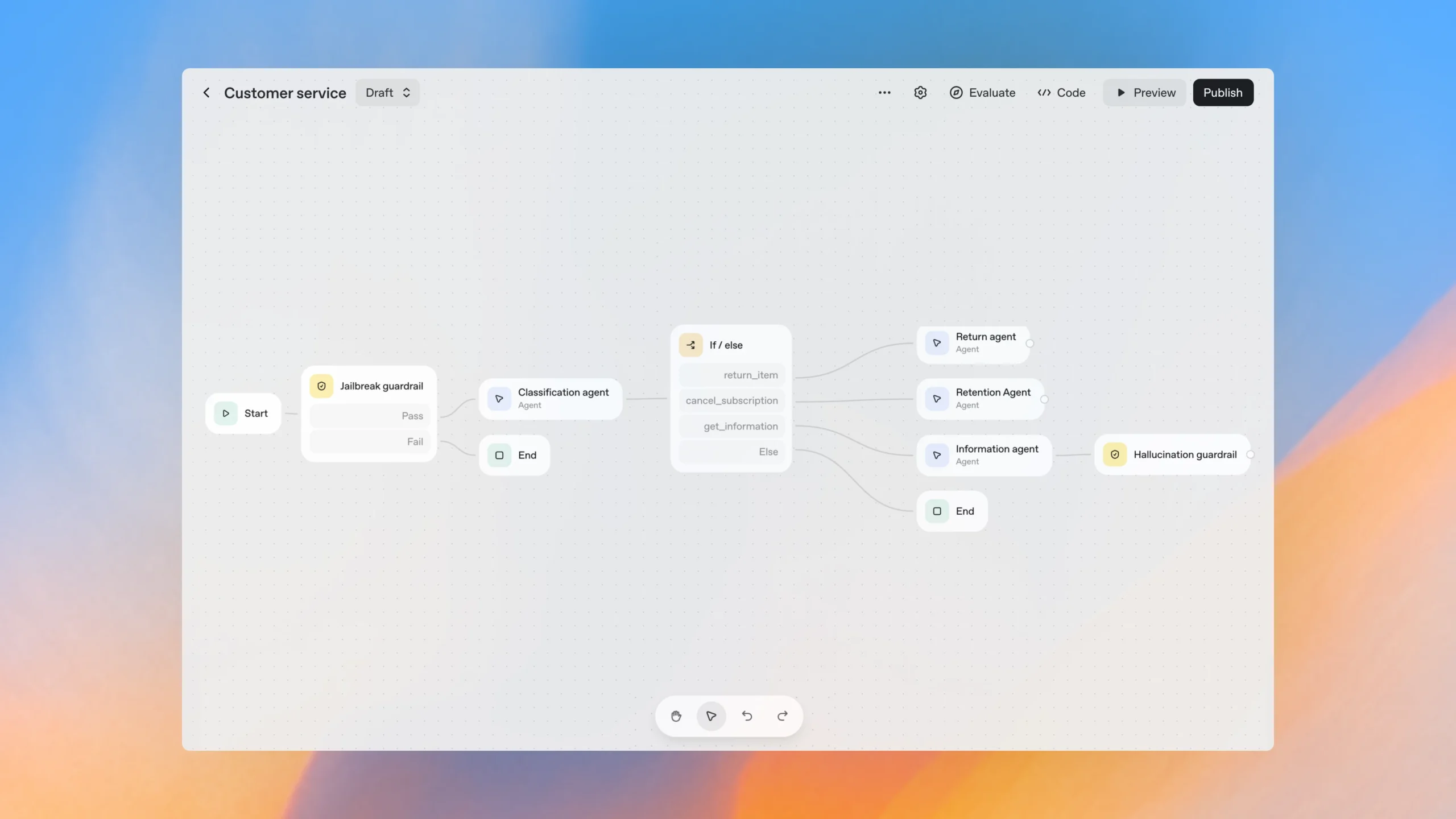
October 6th, 2025. OpenAI drops AgentKit at DevDay. Agent Builder goes live—a visual workflow canvas for building multi-agent systems. Drag-and-drop nodes. Human approval flows. MCP integrations. Templates that actually work.
As an n8n automation specialist, I should’ve been threatened. Here’s OpenAI building “Canva for agents,” directly competing with the visual workflow tools I’ve built my entire freelance practice on.
Instead, I was excited.
Finally, a way to build agents without drowning in SDK configuration and custom widget code. Just connect the nodes, test in preview, deploy. Easy, right?
Wrong.
Hours into building an IT ticket agent, I hit the same walls that would’ve existed whether I was using the visual builder or writing raw SDK code. SDK configuration layers that didn’t make sense. ChatKit widget components that didn’t exist. SQL inserts that failed because a boolean wasn’t actually a boolean.
Here’s what nobody tells you about visual workflow builders: they abstract complexity, but they don’t eliminate it. When something breaks—and it will—you need to understand what’s happening underneath those pretty nodes.
Let me show you what I mean.
The Goal: An IT Ticket Agent That Actually Works
Simple concept: an agent that drafts IT tickets, gets human approval, then writes to Postgres. The kind of workflow that sounds straightforward until you try to build it.
Stack:
- Agent Builder for the visual workflow
- ChatKit for the review UI
- n8n + Postgres for persistence (because I’m an n8n automation specialist and I know what works)
Expected flow:
- Agent drafts ticket with title, description, criticality
- Show a review widget with editable fields
- Human approves or rejects
- Write to database
What could go wrong?
Turns out: everything.
The First Ten Minutes (When It Felt Like Magic)
I’ll give OpenAI credit—they made it ridiculously easy to get started. The interface is clean. The node library is comprehensive. The templates are actually useful, not just marketing demos.
I started with a blank canvas and dragged in my first nodes:
- Agent node (the LLM brain)
- Human Approval node (for review)
- MCP Connector node (to call my n8n webhook)
Connected them with arrows. Added some basic instructions in the Agent node about ticket formatting. Hit preview.
For about 10 minutes, I thought, “Damn, this is actually pretty slick.”
The agent generated a reasonable ticket. The approval node showed up in the preview interface. The flow logic was transparent—I could see exactly which node was executing at any given moment.
Then I tried to actually implement the review widget properly.
That’s when reality hit.
The Code-First Gauntlet: Three Bugs That Taught Me Everything
Problem #1: SDK Config Layer Confusion
My first mistake was treating the SDK like any other API client. I stuffed storage flags and session handling into ModelSettings because that’s where configuration goes, right?
Wrong.
ModelSettings is only for LLM parameters—temperature, top_p, that kind of stuff. The actual agent lifecycle, storage, and session management belong in the Runner.run(...) call or application code.
I spent two hours thinking the model was failing when really, my configuration was just in the wrong layer. The agent loop was terminating early because I hadn’t properly wired the final output check in the runner.
# What I thought worked (WRONG)
settings = ModelSettings(
    model="gpt-4",
    temperature=0.7,
    # Don't do this - storage doesn't go here
    storage_enabled=True,
    session_management=True
)

# What actually works
settings = ModelSettings(
    model="gpt-4",
    temperature=0.7
)

# Storage and session management happen in the runner
result = runner.run(
    agent=my_agent,
    storage=my_storage,  # HERE
    session_id=session_id  # HERE
)
The fix: Keep ModelSettings lean. Only LLM behavior goes there. Everything else—persistence, sessions, output validation—lives in the runner or app layer.
What I learned: When you can’t find anyone else complaining about an obvious issue, you’re probably not looking at a bug. You’re looking at a misunderstanding of the architecture.
Problem #2: Widget Component Hell
This one was particularly painful because ChatKit looked so clean in the examples. I built my review widget using <Label> and <Textarea> components. Looked great in my code editor.
Rendered as plain text with zero interactivity.
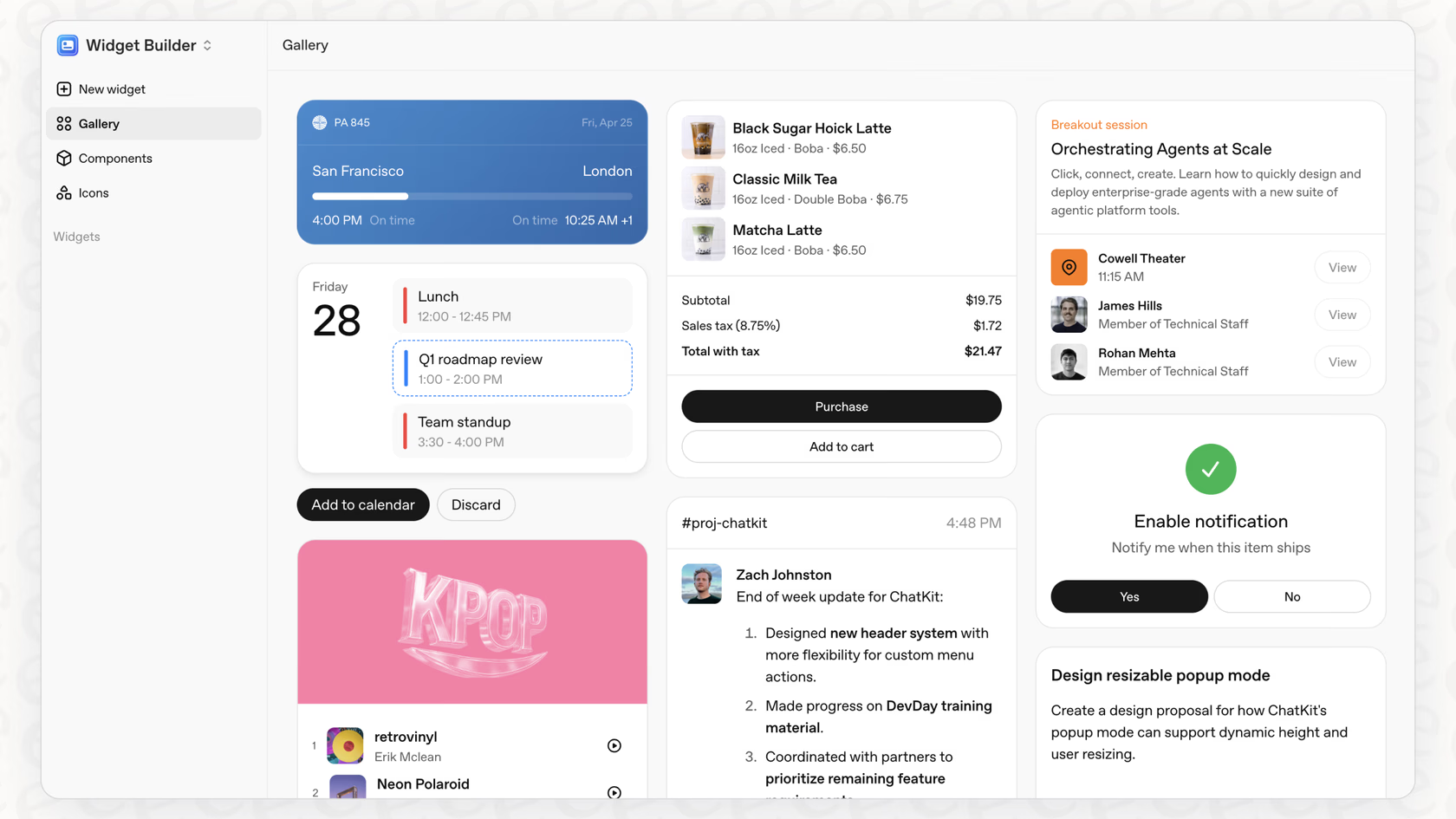
Turns out ChatKit doesn’t ship those components. At all. The actual documented components are: Card, Col, Row, Text, Caption, Title, Divider, Spacer. And if you want an editable field? Use Text with the editable property.
I swapped to the real components and suddenly had a working form that captured edits.
# What DOESN'T work (these components don't exist)
from chatkit.widgets import Label, Textarea, Form

def broken_widget(ticket):
    return Form(children=[
        Label(text="Title"),
        Textarea(value=ticket["title"]),  # Nope
        Label(text="Description"),
        Textarea(value=ticket["description"])  # Still nope
    ])

# What actually works
from chatkit.widgets import Card, Col, Row, Title, Text, Divider, Button
from chatkit.actions import ActionConfig

def review_widget(ticket, workflow_id):
    return Card(
        children=[
            Title(text="Create Ticket — Review"),
            Divider(),
            Text(text=ticket["title"]),
            Text(text=ticket["description"], editable=True, id="desc"),
            Row(children=[
                Button(label="Cancel", onClickAction=ActionConfig(
                    type="cancel", payload={"w": workflow_id})),
                Button(label="Submit", submit=True, onClickAction=ActionConfig(
                    type="submit_ticket", payload={"w": workflow_id}))
            ])
        ]
    )
The fix: Only use documented components. If it’s not in the official docs, it doesn’t exist. Replace it.
What I learned: Most “AI bugs” are actually interface bugs. The model looks smarter when the UI doesn’t fight against it.
Problem #3: MCP Approval Requests Are Not Optional
This was the bug that made me understand what Agent Builder would eventually solve—but doesn’t yet.
My agent called create_ticket directly via an MCP connector, and the platform responded with an MCP approval request. I thought this was just a suggestion or maybe a nice-to-have feature.
It’s not. It’s a first-class item type that the agent loop MUST handle. If you ignore it, the run just stalls. No error, no timeout warning—just silence.
The error message was clear once I saw it: mcp_approval_request missing reasoning. MCP approval isn’t friction. It’s a required guardrail with a specific contract you have to satisfy.
# The approval flow that actually works
if action.type == "submit_ticket":
    # 1. Validate the edited data
    # 2. Include reasoning for the approval decision
    # 3. THEN call the tool
    result = await createTicket(
        action.data,
        reasoning="User approved via UI"
    )
    return json({"ok": True, "result": result})
The fix: Treat approval as a state in your workflow, not an error condition. The run produces an MCPApprovalRequestItem. Your UI surfaces a review. The user makes a decision. Only then does the runner continue.
What I learned: Design approvals as part of the system from the start. The SDK exposes them as first-class items for a reason.

Bonus Problem: The Boolean That Broke Everything
This one was pure SQL hell. My insert kept failing with: invalid input syntax for type boolean: 'part of the description'.
Wait, what?
The boolean field was getting part of the ticket description. Commas in my free-text fields were shifting parameters. Postgres was correctly rejecting garbage data, but I was blaming the database.
The real problem: I was building SQL with string concatenation like some kind of caveman. Free text + commas = parameter parsing chaos.
The fix: Push structured data end-to-end. Use parameterized queries. In n8n, that means using the Postgres node’s Query Parameters or $json bindings—never string interpolation.
-- BROKEN: String concatenation with free text
INSERT INTO tickets (title, description, is_critical)
VALUES ('New ticket', 'Text with, commas', true);
-- Commas in the description break parameter parsing

-- SAFE: Parameterized query
INSERT INTO tickets (title, description, is_critical)
VALUES ($1, $2, $3::boolean)
RETURNING id;

-- In n8n: bind with $json.title, $json.description, $json.is_critical
-- Let n8n handle the type conversion
What I learned: Not a database bug. A parameter-shape bug. Serialize as JSON, validate types at the edge, and let the ORM or query builder handle sanitization.
The Reality: Agent Builder Doesn’t Prevent These Problems
Here’s what I thought Agent Builder would handle for me:
Visual Workflow = No Configuration Issues
Wrong. I still needed to understand that ModelSettings is only for LLM parameters, not storage or session management. The visual nodes don’t tell you this—you just get a cryptic error when your agent loop terminates early.
Human Approval Node = No SDK Wrangling
Partially true. The node exists and you can drag it in. But when the MCP approval request comes through, you still need to understand MCPApprovalRequestItem, how to surface the review in your UI, and how to wire the decision back properly. The node doesn’t write that code for you.
MCP Node = No Integration Headaches
The node simplifies tool registration, sure. But it doesn’t prevent you from using non-existent ChatKit components or building broken widget interfaces. You still need to know the actual documented components.
Preview Feature = Catch Problems Early
It helps with flow logic, but it won’t catch SQL parameter binding issues or tell you that your boolean field is receiving part of the description text.
Agent Builder is a massive productivity boost for visualizing and iterating on agent workflows. But it’s not magic. The underlying SDK, ChatKit, and database integration still work the same way—you just have a nicer interface for wiring them together.
What Agent Builder Actually Gives You
Let me be clear: Agent Builder is valuable. Here’s what it genuinely improves:
Visual Workflow Composition
Drag-and-drop nodes for agents, tools, logic, and data operations. Connect them with typed edges so you can see the data flow. It’s basically n8n for AI agents, and as an n8n specialist, I immediately understood the value.
Built-in Node Library
Human Approval, MCP connectors, Guardrails (PII detection, jailbreak prevention), File Search, If/Else logic, While loops. All the building blocks you need without writing orchestration code.
Templates and Preview
Start from working examples like “homework helper” or “customer support.” Test workflows interactively with real data before deployment. This alone saves hours compared to code-first approaches.
Version Control and Publishing
Autosaves, major version publishing, workflow IDs for ChatKit embedding. Export to SDK code when you need more control.
The key insight: Agent Builder accelerates workflow design and makes agent logic visible to non-technical stakeholders. But it doesn’t eliminate the need to understand what’s happening at each node.

When the Visual Builder Is Enough (And When It’s Not)
After fighting through these bugs in Agent Builder, here’s my honest take:
Agent Builder handles well:
- Prototyping workflows and getting stakeholder buy-in
- Common patterns (support agents, research assistants, routing logic)
- Making agent logic visible to non-technical team members
- Letting OpenAI host and scale the backend
- Iterating quickly on workflow structure
You need SDK knowledge for:
- Understanding why your configuration isn’t working (ModelSettings vs Runner)
- Debugging ChatKit widget rendering issues
- Implementing custom business logic that doesn’t fit standard nodes
- Handling edge cases in data flow between nodes
- Troubleshooting approval flow state management
- Running agents on your own infrastructure
- Fixing parameter binding and database integration bugs
The truth: Agent Builder is your starting point, not your finish line. Use it to build the workflow, but be ready to understand the underlying SDK when things break. Because they will.
What I Actually Learned (The Real Lessons)
1. Visual abstractions have limits
Agent Builder makes workflow composition faster and more intuitive. But it doesn’t shield you from needing to understand:
- How approval flows work at the protocol level
- What ChatKit widgets actually do under the hood
- How the runner manages state between agent calls
- Why parameter binding matters for security
The visual interface is a productivity tool, not a knowledge replacement.
2. You debug at the abstraction layer below where you build
I was building in Agent Builder’s visual canvas. But I was debugging SDK configuration, ChatKit components, and SQL queries. That’s one abstraction layer down.
If you don’t understand that layer, you’re stuck when the visual builder can’t solve your problem.
3. The visual approach reveals workflow problems, not implementation bugs
Agent Builder’s preview caught logic issues—wrong routing, missing steps, unclear data flow. That’s valuable.
It didn’t catch: SDK config in the wrong layer, non-existent widget components, or parameter binding issues. Those require understanding what each node actually does when it runs.
4. Approvals are features, not friction
I initially thought approval requests were OpenAI being overly cautious. After implementing them properly, I get it—they’re architectural boundaries that force you to think about where humans need to be in the loop.
Agent Builder makes this explicit with the Human Approval node. You can’t accidentally skip it. That’s a good thing.
5. ChatKit is powerful when you stop fighting it
The documented widgets aren’t limiting—they’re design constraints that make your UI consistent and maintainable. Use Text.editable instead of inventing <Textarea>. Use Button with ActionConfig instead of building custom handlers.
The framework becomes freeing once you stop trying to bypass it.
6. Parameter safety is non-negotiable
That Postgres boolean bug taught me that free text will always break naive string handling. JSON in, parameters out. Every single time. No exceptions.
Agent Builder doesn’t solve this directly, but the structured data flow between nodes makes it harder to accidentally concatenate user input into SQL.
My Workflow Today: Start Visual, Go Deep When Needed
Here’s what I actually do now when building OpenAI agents:
Phase 1: Agent Builder First
- Build the workflow visually to validate the logic
- Use Preview to test with real data
- Get stakeholder approval on the flow
- Iterate quickly on the visual canvas
Phase 2: Understand What’s Actually Running
- Export the SDK code to see what Agent Builder generates
- Read the ChatKit documentation for the widgets I’m using
- Verify data contracts between nodes
- Test database integration with proper parameterization
Phase 3: Debug at the Right Layer
- Workflow logic problems? Fix in Agent Builder
- SDK configuration issues? Fix in the generated code
- Widget rendering problems? Fix the ChatKit implementation
- Database issues? Fix the parameter binding in n8n or direct SQL
Phase 4: Deploy
- Use ChatKit for the frontend (embedded in client sites)
- Run the workflow backend on OpenAI’s infrastructure
- Monitor with trace grading from Agent Builder’s eval tools
This gives me the speed of visual development without being blind to what’s happening underneath.
For My Fellow n8n Users
If you’re building automation workflows in n8n (like I do for clients), here’s how AgentKit fits into your stack:
Agent Builder + n8n = Powerful Combination
- Use Agent Builder for the agent orchestration and decision logic
- Use n8n for the tool layer—expose workflows as webhooks
- Register n8n webhooks in Agent Builder’s MCP node
- Let each tool do what it’s best at
Why this works:
- n8n handles complex API orchestration, data transformation, and integration logic
- Agent Builder handles the AI reasoning, approval flows, and chat UI
- You’re not fighting with either tool to do something it wasn’t designed for
I’ve tested this pattern with customer support agents that use n8n to:
- Fetch CRM data (Salesforce, HubSpot)
- Check order status (Shopify, custom databases)
- Update tickets (Linear, Jira)
- Send notifications (Slack, email)
While Agent Builder handles:
- Conversational flow and intent understanding
- Human escalation and approval workflows
- Multi-step reasoning and decision trees
- The chat UI with ChatKit
The key insight: Don’t try to replace n8n with Agent Builder or vice versa. They solve different problems. Use both, and let each do what it’s best at.
The Bigger Picture: AgentKit Changes the Game
Agent Builder isn’t the only thing OpenAI launched on October 6th. AgentKit includes:
Connector Registry – Centralized management for data sources across ChatGPT and API. Admins can govern how tools connect across the entire organization. This is huge for enterprise deployments.
Expanded Evals – Datasets, trace grading, automated prompt optimization, and third-party model support. Actually usable evaluation tools instead of rolling your own.
Guardrails Library – Open-source, modular safety layer in Python and JavaScript. PII masking, jailbreak detection, all the security stuff you should be doing but probably aren’t.
ChatKit Enhancements – The embedding just works better now. Streaming responses, thread management, widget rendering—all the edge cases I hit building it manually are now solved.
This is OpenAI saying “we’re serious about production agent deployments.” They’re not just shipping models anymore. They’re shipping the entire stack.
The Real Lesson: Visual Tools Are Accelerators, Not Replacements
Agent Builder is incredibly valuable. It cut my workflow design time from days to hours. The visual canvas made stakeholder communication infinitely easier. Preview caught logic bugs before deployment.
But it didn’t prevent SDK configuration mistakes. It didn’t tell me which ChatKit components actually exist. It didn’t catch my SQL parameter binding disaster.
Those bugs required understanding what Agent Builder abstracts away. And that understanding only comes from reading the SDK docs, studying the ChatKit component library, and knowing how database parameterization works.
The lesson: use Agent Builder to build fast. But invest time understanding the platform underneath. When production breaks at 2am—and it will—you’ll need to know where to look.
Visual workflow builders accelerate development. They don’t eliminate the need for platform knowledge. The developers who understand both layers will ship faster and debug smarter than those who rely on abstraction alone.
Have you built with Agent Builder yet? I’m curious if you’ve hit similar bugs where the visual interface couldn’t save you from needing to understand what’s underneath.
Building AI agents in 2025 means balancing speed and knowledge. Agent Builder gives you speed. Understanding the SDK, ChatKit, and proper database integration gives you the knowledge to fix things when they break.
Use both. Build fast with visual tools. Learn deep so you can debug when it matters.
That’s what these three bugs taught me.