
There’s a special kind of professional exhaustion that comes from being really good at something: you end up answering the same questions over and over again.
For me, that’s AWS architecture decisions.
Every new client conversation follows the exact same pattern:
Client: “Should we use Lambda or EC2 for this?”
Me: Launches into my standard 5-minute explanation about runtime limits, cost models, and when to choose each
Client: “What about the database—RDS or DynamoDB?”
Me: Gives the same relational-vs-key-value speech I’ve given 50 times
Client: “Do we need SQS for this workflow?”
Me: Explains buffering, back-pressure, and when queues actually matter—again
I’m not complaining about client questions. That’s literally what they’re paying for. But I was starting to feel like a human documentation service, copy-pasting the same architectural advice into every Slack thread and Zoom call.
Then Anthropic released Claude Skills last week, and I thought, “Oh great, another AI feature I need to learn.”
Turns out this one actually solves my exact problem. But not in the way I expected.
What I Thought Skills Were (Spoiler: I Was Wrong)
When I first heard about Claude Skills, I made the same assumption most developers probably make: they’re basically MCP servers—little programs that let Claude access external data or call APIs. You know, because that’s what we’ve been building with the Model Context Protocol.
Nope.
Skills are way simpler than that. And that simplicity is exactly what makes them powerful.
A Skill is just a folder with a markdown file that teaches Claude how to do something your way.
That’s it. No servers to run, no APIs to manage, no JSON-RPC protocol to implement. Just a markdown file with some metadata and instructions.
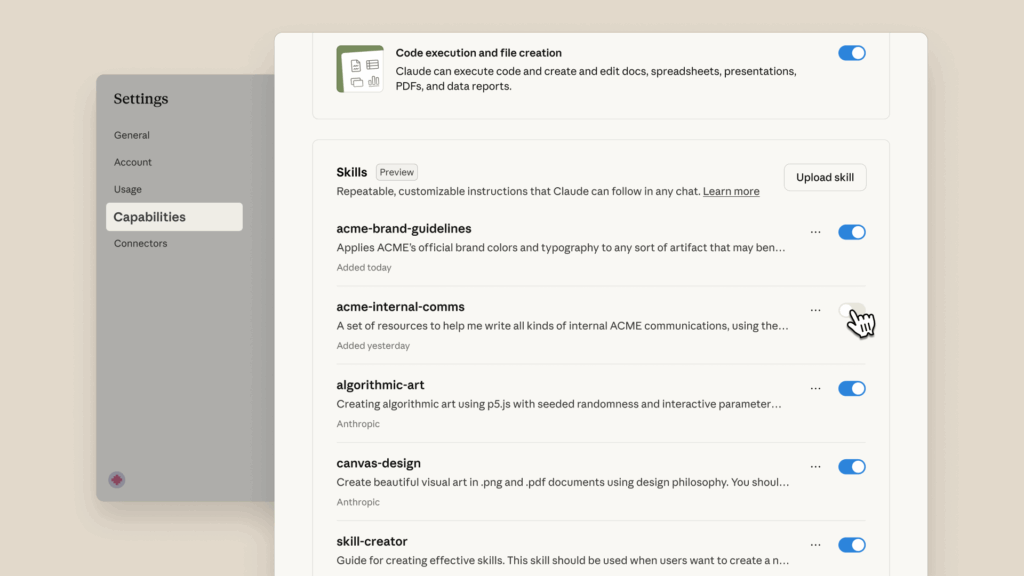
Here’s what actually happens:
- You create a
SKILL.mdfile with metadata and your patterns - Claude scans all available Skills at startup and reads just the name and description (super token-efficient)
- When you ask Claude something relevant, it loads that specific Skill
- Claude responds using your patterns, your decision trees, your preferences
The genius part? Skills can also include executable scripts for when traditional programming is more reliable than token generation. Need to validate a complex PDF form? Include a pre-written validator script. Need to calculate AWS costs with precision? Drop in a Python script.
But the core value is simpler: you’re teaching Claude your way of doing things, and it remembers without you repeating yourself every single time.
My First Attempt: Building an AWS Architecture Skill
I decided to create a Skill that encodes my go-to AWS patterns. Not because I’m trying to replace myself (please, no), but because I wanted Claude to give consistent, useful first answers when I’m helping clients think through architecture.
I opened up a text editor and started writing what I thought would be straightforward:
---
name: aws-solution-patterns
description: AWS architecture recommendations
---

# AWS Solution Patterns

Use Lambda for serverless stuff. Use EC2 when you need servers.
Yeah, that lasted about 30 seconds before I realized how useless that would be.
The problem: I wasn’t just documenting facts about AWS services. I was trying to capture my decision-making process—the “when and why” that comes from building production systems for dozens of clients.
The Messy Reality: Decision Trees Are Hard to Document
This is where I hit my first wall. How do you write down intuition?
When a client asks “Lambda or EC2?”, I don’t just list features. I run through a mental checklist:
- How long does this need to run?
- Is the traffic predictable or bursty?
- Do they have operational bandwidth for server management?
- What’s the team’s comfort level with serverless?
- Is cost sensitivity driving this, or uptime guarantees?
Trying to encode that into a markdown file felt like trying to write down how to ride a bike. You know how to do it, but explaining it clearly is a completely different skill.
I spent probably two hours iterating on just the Lambda vs EC2 section, trying to find the right balance between comprehensive and useful. Too detailed and it’s overwhelming. Too simple and it’s generic advice Claude could generate anyway.
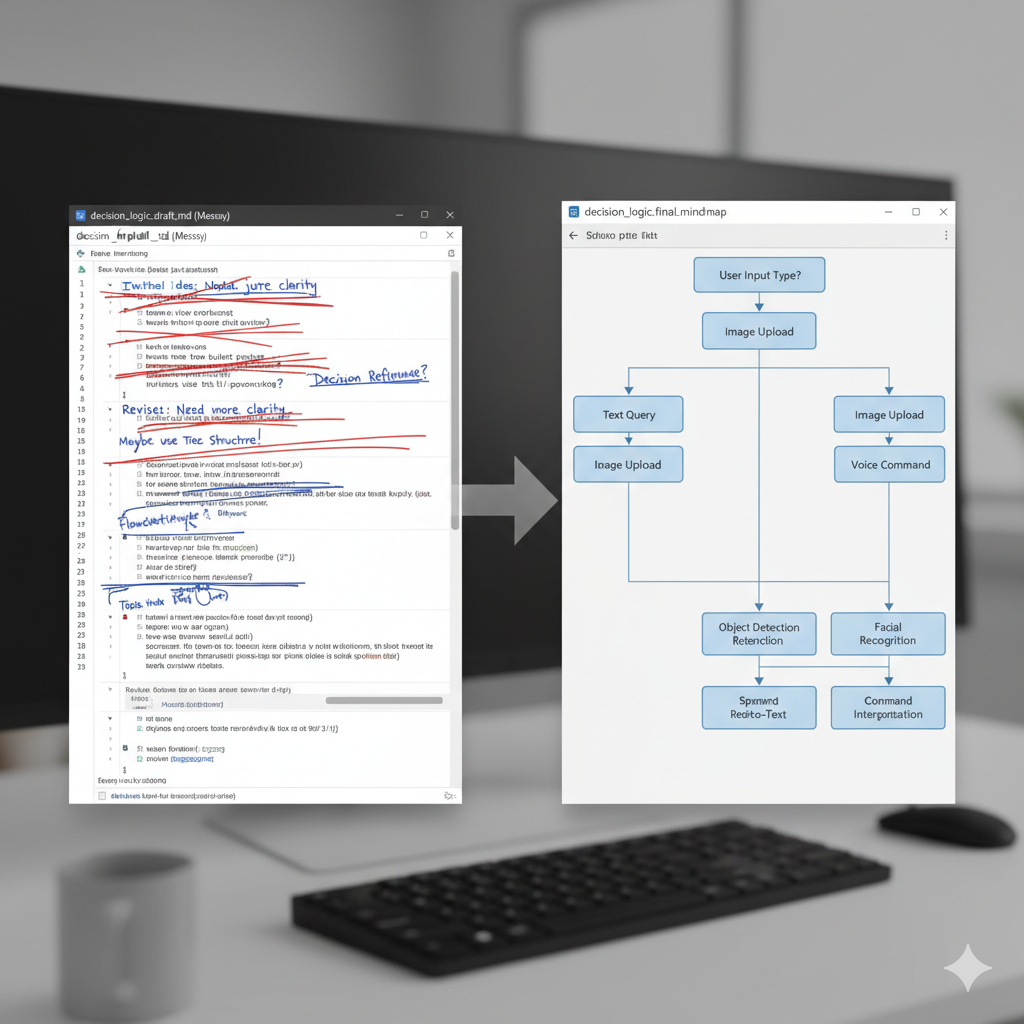
[Image 2 description: Split-screen showing a messy markdown file with strikethroughs and rewrites on the left, and a cleaner version with structured decision trees on the right, highlighting the iterative process of documenting decision-making logic]
Here’s what I eventually landed on:
## Compute Decision Tree

### Lambda
**Use when:**
- Job runtime < 15 minutes
- Event-driven workloads (S3 triggers, API requests, scheduled tasks)
- Unpredictable or bursty traffic
- You want zero infrastructure management

**Example:** Daily data sync, webhook processors, API endpoints with <10K requests/day

**Why:** Pay only for execution time. No patching, no scaling config, automatic fault tolerance.

### EC2
**Use when:**
- Long-running processes (>15 min continuous runtime)
- Custom system requirements or specialized software
- Workloads that need persistent local state
- Very high, consistent traffic where reserved capacity is cheaper

**Example:** Self-hosted tools, legacy applications, compute-intensive batch jobs

**Why:** Full control, longer runtimes, but you own the operational overhead.
The “why” section was critical. Claude doesn’t just need to know what to recommend—it needs to know why I’d recommend it so it can explain the reasoning to clients.
Testing It: The “Before and After” Moment
After finalizing the Skill (which ended up being about 200 lines covering compute, storage, messaging, idempotency patterns, and monitoring), I needed to test if it actually worked.
I opened a fresh Claude conversation and asked the exact same question I’d answered for three different clients in the past month:
Me: I need to sync Asana tasks to a Google Sheet once per day for a marketing team. What’s the best way to do this on AWS?
Without the Skill (How Claude Usually Responds)
Claude: There are several approaches you could take for this integration:
- You could use an EC2 instance with a cron job…
- Or AWS Lambda triggered by CloudWatch Events…
- Another option would be ECS with a scheduled task…
- For the database, you might consider RDS, DynamoDB, or even S3…
Each has trade-offs depending on your requirements. What’s your scale and budget?
(Generic, wishy-washy, requires me to provide context before getting useful advice)
With My Skill Enabled
Claude: For a daily sync that runs briefly, Lambda is the clear choice. Here’s the architecture:
Trigger: EventBridge rule with rate(1 day) expression
Compute: Single Lambda function (Python)
State: DynamoDB table for idempotency (task_id → last_synced_hash)
Flow: Fetch from Asana → Check DynamoDB for changes → Write to Sheets
Monitoring: CloudWatch alarms on errors and throttles
Why Lambda? This job runs for seconds and sleeps for 23+ hours. EC2 would cost you for idle time. Lambda scales automatically and you pay only for execution.
Why DynamoDB? You only need “have I seen this task before” lookups. No JOINs, no complex queries. DynamoDB gives you fast key-value access with minimal cost.
Idempotency: Hash the transformed row content. If the hash matches what’s stored for that task_id, skip the write. Prevents duplicates and unnecessary API calls to Sheets.
Cost: ~$0.50/month for this workload (assuming 100 tasks, daily sync, 2-second runtime). Most of that is DynamoDB storage, not Lambda.
I literally said “holy shit” out loud when I saw that response.
This wasn’t just Claude regurgitating AWS documentation. This was Claude applying my actual decision-making framework to a specific problem and coming up with the same architecture I would’ve recommended.
The difference is night and day. The first answer is “here are some options, tell me more.” The second answer is an actual recommendation with reasoning based on patterns I’ve developed working with real clients.
What Actually Makes Skills Different from MCP
I kept trying to make my Skill “do things”—call AWS APIs, fetch current pricing, interact with services. That’s when I realized I was still thinking about this wrong.
Skills are not MCP servers. They’re complementary but completely different tools:
MCP (Model Context Protocol):
- Connects Claude to external systems and APIs
- Lets Claude fetch real-time data or trigger actions
- Requires running a server and implementing the protocol
- Example: GitHub MCP server that lets Claude read your repos and issues
Skills:
- Teach Claude how to think about problems your way
- Encode your decision-making patterns and preferences
- No servers, no runtime, just instructions
- Example: “Here’s how I evaluate AWS services for client projects”
They work together beautifully. MCP gives Claude access to data. Skills give Claude the framework for interpreting and using that data according to your standards.
The Scripts Thing (That I Haven’t Used Yet)
Skills can include executable code—Python scripts, shell commands, whatever—for cases where traditional programming is more reliable than token generation. For example, I could include a cost calculator script that Claude runs when estimating AWS pricing.
But honestly? I haven’t needed it yet. The instructions alone are powerful enough for my use case.
Where I could see using scripts:
- PDF form validation (complex regex patterns that Claude might generate inconsistently)
- Financial calculations requiring exact precision
- Data transformations with strict formatting requirements
- Anything where a 99.9% accuracy rate isn’t good enough
For most AWS architecture advice, the decision logic is what matters, not perfect mathematical precision.
The Token Efficiency Breakthrough
Here’s something I didn’t appreciate until I looked at the usage stats: Skills are incredibly token-efficient.
When Claude starts up, it reads just the name and description of every available Skill—maybe 30-50 tokens per Skill. The full instructions only load when they’re actually relevant to your query.
Compare that to MCP connections, where just having GitHub’s connector available can consume tens of thousands of tokens in context, whether you’re using it or not.
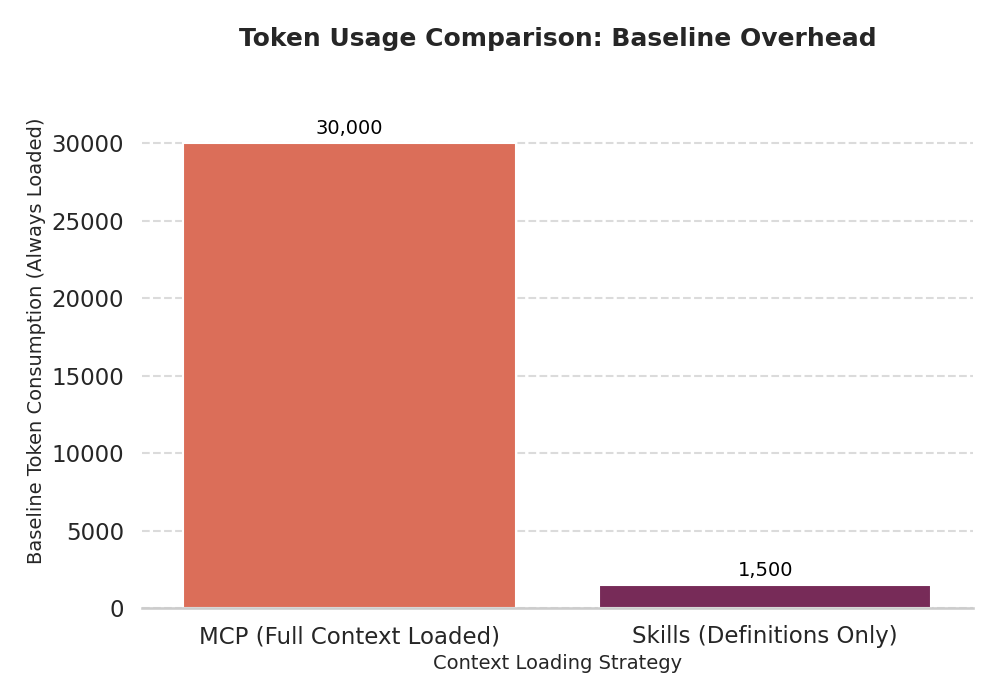
This changes the economics of context management.
With MCP, you have to be strategic about which connectors you enable because they all eat into your context window. With Skills, you can have dozens of them available and only pay for the ones you actually use in a given conversation.
For someone like me who’s building automation solutions across multiple domains (AWS, n8n, database design, API integration), this is huge. I can create specialized Skills for each area without worrying about context bloat.
The Real Impact After One Week
I’ve been using my AWS Solution Patterns Skill for a week now. Here’s what changed:
Time saved: I’m not typing the same architecture explanations into client Slack threads anymore. I ask Claude for a first-pass recommendation, review it, maybe add project-specific nuances, and send it. What used to take 15-20 minutes now takes 5.
Consistency: Every client gets the same baseline recommendations. I’m not accidentally forgetting to mention idempotency strategies because I’m tired or rushed. The Skill ensures the fundamentals are always covered.
Teaching tool: I’m actually using this to train a junior developer on my team. They read the Skill file to learn my patterns, then watch Claude apply them in real scenarios. It’s like pair programming with my documented expertise.
Faster proposals: When scoping projects, I can sketch architectures way faster because Claude’s first pass is already 80% of what I’d recommend. I spend time on the unique aspects, not recreating the basics.
Better client conversations: Instead of explaining why I’m recommending Lambda over EC2, I can focus on project-specific trade-offs because the baseline reasoning is already there.
The cost has been exactly $0 in infrastructure. No servers, no API calls, no maintenance. Just a markdown file that makes my time more valuable.
What I Learned (The Lessons Nobody Tells You)
1. Writing a Skill is harder than you think
Documenting your intuition is genuinely difficult. I thought I understood my own decision-making process until I tried to write it down clearly enough for an AI to apply it consistently.
Expect to iterate. A lot. My Skill went through probably eight major revisions before it felt right.
2. Be opinionated, but not dogmatic
The whole point of a Skill is to encode your way of doing things. Don’t try to cover every possible edge case or make it universally applicable.
But include override instructions: “When to deviate from these patterns” sections let Claude adapt when client constraints or specific requirements make your defaults wrong.
3. Examples are worth 1000 words of explanation
Every decision tree in my Skill includes concrete examples:
- “Daily data sync, webhook processors, API endpoints with <10K requests/day”
- “User management, order processing, any workflow with related entities”
These examples help Claude pattern-match real scenarios to your recommendations way better than abstract descriptions.
4. The “why” is more important than the “what”
Claude already knows what Lambda and EC2 are. What it needs from your Skill is why you choose one over the other in specific contexts.
The reasoning is what makes your Skill valuable. The facts are just supporting details.
5. Start narrow, expand later
I was tempted to create one massive “everything I know about cloud architecture” Skill. That would’ve been overwhelming to maintain and probably less useful.
Instead, I started with just my most common architectural decisions. Now I’m planning separate Skills for:
- n8n workflow patterns
- Client proposal structures
- Debugging checklists
- Cost optimization strategies
Specialized Skills are more maintainable and more effective than one giant knowledge dump.
Who Should Actually Care About This
If you find yourself:
- Giving the same technical advice repeatedly across clients or team members
- Wishing your team followed consistent patterns without constant reminders
- Copy-pasting the same code templates or architectural decisions from previous projects
- Spending the first 10 minutes of every Claude conversation “warming it up” with context
- Training new developers and explaining “here’s how we do things” over and over
…then Skills might be exactly what you need.
The beauty is they’re just markdown files. No servers to run, no APIs to maintain, no complex integrations. You write down how you do things, and Claude remembers.
What’s Next for My Skills Collection
I’m planning to build a few more based on where I spend repetitive mental energy:
n8n Workflow Patterns Skill:
- My go-to architectures for common automation scenarios
- Error handling patterns that actually work in production
- When to split workflows vs keep them monolithic
- Database integration best practices
Client Proposal Templates Skill:
- How I structure SOWs and technical scopes
- Pricing frameworks for different project types
- Timeline estimation based on complexity factors
- What to include in production deployment plans
Debugging Checklist Skill:
- My systematic approach when things break
- Which logs to check first
- Common gotchas by service (Lambda vs ECS vs EC2)
- When to escalate vs keep investigating
The more I use Skills, the more I realize they’re not about making Claude smarter—they’re about making Claude think like me when that’s actually useful.
And honestly? That saves way more time than I expected.
Try It Yourself
Skills are available to Claude Pro, Team, and Enterprise users. They work across Claude.ai, Claude Code, and the API.
To get started:
- Go to Settings > Capabilities
- Enable “Code execution and file creation” (prerequisite for Skills)
- Toggle on Skills
- Click “Create new skill” or use one of Anthropic’s pre-built ones
Pro tip: Start with something you explain constantly. Not your deepest expertise—just the patterns you’re tired of repeating. That’s where Skills shine.
If you build something interesting, I’d love to hear about it. What knowledge are you tired of re-explaining? What patterns would you want Claude to remember?
The Bottom Line
Claude Skills turned out to be way more practical than I expected. They’re not trying to be everything—they’re focused on one specific problem: helping AI remember and apply your patterns without you repeating yourself.
No servers, no APIs, no maintenance. Just documented expertise that makes your time more valuable.
For someone building automation solutions across AWS, n8n, and multiple client projects, that’s exactly what I needed.
Sometimes the best tools aren’t the most complex—they’re the ones that solve the actual problem you have.
Building AI solutions that work in practice means teaching them your patterns, not hoping they guess correctly every time. Skills make that ridiculously easy.