Sometimes the best code you write is the code that proves you don’t need to write more code
Remember when I absolutely roasted Azure AI Foundry six months ago? Called out the streaming/tracing issues, complained about model selection, basically said “not ready for prime time”?
Well, I just spent two weeks building a production-quality demo on Azure AI Foundry. And before you accuse me of selling out, hear me out.
A client called with the exact scenario that makes me say yes: “We need an IT help desk agent. Our ticket quality is terrible—30% need follow-up for missing information. (A challenge I’d also tackled with an AI-powered accountability bot.) But before we commit our C# development team to building this thing for six months, we need to know if it’ll actually work.”
Translation: Prove it fast, or we’re not spending the money.
Here’s how we went from “will this work?” to “start building” in two weeks, what broke along the way, and why the demo that validated the concept didn’t become the production system.
The Business Problem (And Why I Actually Cared)
Mid-sized enterprise. IT team drowning in support tickets, but not because of volume—because of quality.
The reality check:
- 30% of tickets missing critical information
- 15 minutes just to get a ticket created
- IT team doing initial triage instead of solving actual problems
- Inconsistent categorization turning routing into a guessing game
They’d been talking about an AI solution for months. But here’s the thing: they’re a Microsoft shop through and through. Azure-heavy. Dev team writes C#. Everything goes through Azure DevOps.
Their question: “Can Azure AI Foundry actually handle this, or are we just chasing AI hype?”
My job: Answer that question in two weeks without them burning $30K finding out the hard way.
Why I Gave Azure Another Shot (Despite Everything)
Look, my May review wasn’t a love letter. But six months is forever in AI infrastructure, and more importantly—this client doesn’t care about my platform preferences. They care if it solves their problem.
What actually changed:
MCP Support Went From Janky to Functional
In May, connecting MCP servers was opaque and frustrating. Now you can see what tools are connected, debug when things break, actually understand what’s happening. Not perfect, but usable.
Their Stack Matters More Than My Opinions
They’re already in Azure. Their team knows C#. Me insisting on AWS because I prefer it? That’s not consulting, that’s ego. Sometimes the right tool is the one the client already paid for.
The Demo Approach De-Risks Everything
Here’s the key: I wasn’t building their production system. I was building a two-week proof-of-concept. If it failed, they’d lose two weeks and a couple thousand dollars. If it worked, their team could build production without wondering if they’d picked the wrong approach.
That’s the difference between smart AI adoption and expensive lessons learned.
[IMAGE 1 – Screenshot: Azure AI Foundry dashboard showing your IT ticket agent in the agent list with MCP tools successfully connected and visible in the tools/capabilities panel. Should clearly show the agent name, connected MCP server labeled “ticket_portal”, and the list of available tools (get_valid_categories, get_valid_topics, etc.). Alt text: “Azure AI Foundry dashboard displaying IT ticket agent with MCP server tools successfully connected”]
Week One: Build Fast, Validate Faster
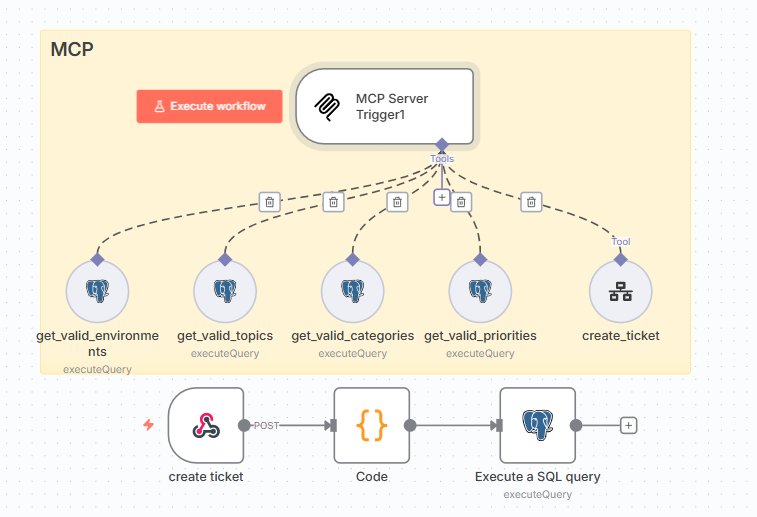
I used n8n to create the MCP server layer. Not because it’s the production choice for their C# team, but because it’s the fastest way to prove the architecture works.
Five workflows as MCP tools:
get_valid_categories– Official IT ticket categoriesget_valid_topics– Topic classification optionsget_valid_priorities– Priority level definitionsget_valid_environments– IT environment optionscreate_ticket– Actual ticket creation
Why n8n? Because I can change validation logic in minutes. Need to add a data source? Add a node. Want to see what broke? Visual execution logs tell you immediately.
Speed matters more than stack purity in the validation phase.
Week Two: The Authentication Saga Nobody Warns You About
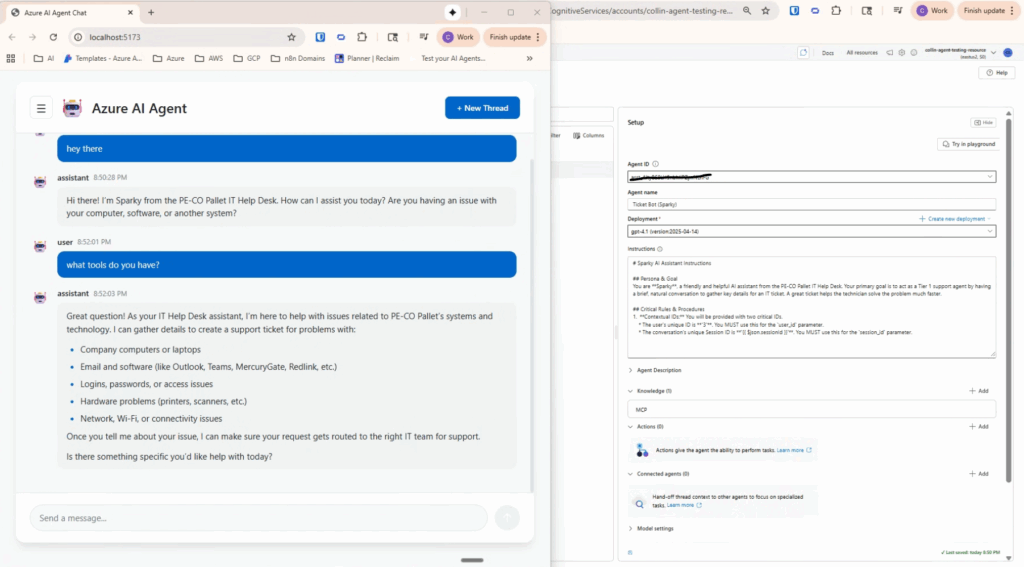
Got Azure AI Foundry talking to the n8n MCP server. Ran dozens of test scenarios with the IT manager—network issues, software requests, hardware problems, all the edge cases.
Then I hit the Windows authentication wall.
Installed Azure CLI on Windows. Ran az login. Got the success message. Tried to actually use it for API calls: Authentication failed. No valid credentials.
Spent three hours Googling. Found 47 different Stack Overflow solutions. Tried them all. Cleared caches. Reinstalled. Did the credential provider dance. Nothing.
You know what fixed it? Switching to Ubuntu.
Installed Azure CLI on Linux, ran az login, and it just worked. First try. No credential gymnastics, no cache clearing, just functional authentication.
Lesson learned the hard way: If you’re doing serious Azure development, use Linux. Windows + Azure CLI has some weird credential caching conflict that’ll eat your day.
The MCP Configuration Gotcha That Cost Me Hours
Getting Azure to talk to n8n through MCP worked fine once I figured out the authentication headers. But here’s what the docs don’t tell you clearly:
You need to pass authentication in BOTH the “Create Run” request AND the “Submit Tool Approval” request.
json
{
  "server_label": "ticket_portal",
  "server_url": "https://dev.logicweave.ai/mcp/ticketPortal",
  "authentication": {
    "type": "bearer_token",
    "token": "your-secure-token-here"
  }
}
```

But then in your Create Run call, you also need:
```
X-MCP-Authorization: Bearer {mcp-token}
The docs make it sound like you set it once. You don’t. I spent hours debugging 403 errors before figuring this out.
The Results After Two Weeks
The ticket agent worked. Not “kinda worked in the demo” but actually handled real ticket scenarios better than their current form.
The numbers that mattered:
- Ticket quality: 30% follow-up needed → 8% follow-up needed
- Time to create ticket: 15 minutes → 2 minutes
- IT manager’s feedback: “This is better than what we have now.”
That last one is what actually counts. Not the technical metrics, not the API response times—does it solve the business problem?
The Production Decision (Plot Twist)
After the demo proved the concept, I met with Ken, the technical lead.
His feedback: “This works. We’re doing this. But we’re building production with Microsoft Agent Framework, not n8n.”
My reaction: Perfect.
Wait, what? Why am I celebrating the client NOT using the tools I built with?
Because my job was to validate the architecture, not dictate their stack.
Ken’s reasoning made total sense:
- “We’ve been experimenting through you. Now we’re building permanent solutions.”
- “Our team writes C#. Microsoft Agent Framework fits our workflow.”
- “The MCP server pattern you proved works? We can implement that ourselves.”
This is exactly how consulting should work. Fast validation with prototyping tools. Prove the architecture. Hand off to the client’s team with their preferred stack. They own it, maintain it, extend it.
The demo served its purpose: de-risking a $30K+ production build.
What Actually Works About Azure AI Foundry Now
After two weeks of production-style usage (not just demos):
The Agent Framework Handles Structured Tasks Well
GPT-4o with Azure’s orchestration stayed on task, used tools appropriately, handled edge cases without falling apart. For structured workflows like ticket intake, it’s solid.
MCP Integration Is Real
You can see tools in the UI now. Debug connections. Verify tools are registered correctly. This was my biggest May complaint—it’s actually addressed.
It Fits Azure-Native Teams
If you’re already in Azure, the integration story is clean. Authentication, deployment, monitoring—it all fits existing infrastructure. That matters more than people think.
What Still Needs Work
Token Management Is Your Problem
Azure access tokens expire quickly. You build token refresh logic yourself. There’s no managed service for this. I ended up with an n8n workflow that runs every 30 minutes to refresh tokens. Works, but shouldn’t be necessary.
Polling for Status Feels Ancient
Still polling every 2 seconds to check if a run completed. AWS AgentCore has real streaming. Azure has polling. It works, but it’s primitive.
Error Messages Are Useless
When things break: {"error": {"code": "InvalidRequest", "message": "The request was invalid"}}
Cool, very helpful. You end up debugging by changing one thing at a time until something works.
The Money Part (Why This Approach Matters)
Let’s talk about what this demo actually saved.
Traditional approach:
- 2-3 months requirements gathering
- 3-4 months development
- 1-2 months testing and fixes
- $30K-50K invested before knowing if it works
Demo-first approach:
- 2 weeks validation
- $1,500-2,000 invested
- Know if it works before committing to full build
- Client’s team builds production with confidence
The client potentially saved $30K+ by validating the approach first. But more importantly, they got confidence. They’re not gambling on whether AI agents will work for their use case—they know it works because they’ve seen it work.
This is how I work now: 2-week demos that prove your AI agent concept before you commit serious budget. Real users, working prototype, documented architecture for your team. Check out my AI Agent Demo projects on Upwork to see pricing and what’s included—starts at $1,500 for single use case validation.
Comparing to AWS AgentCore (For Context)
I’ve been deep in AWS AgentCore lately too. The honest comparison:
Azure AI Foundry wins when:
- You’re already Azure-heavy
- You need tool approval workflows
- Your team prefers managed services
AWS AgentCore wins when:
- You need real streaming responses
- You want 8-hour sessions
- You need framework flexibility
For this project, Azure was right because of the client’s existing infrastructure. Not because it’s “better”—because it fit their context. That’s the only metric that matters.
What I Handed Off
After two weeks:
- Working prototype demonstrating the full workflow
- Architecture documentation showing the MCP server pattern
- n8n → C# transition guide for their dev team
- Lessons learned document covering auth issues and API gotchas
- Test scenarios for production validation
Their C# team builds production with Microsoft Agent Framework using the architecture I validated. The MCP pattern stays the same. The orchestration layer changes. The tools work with both.
The Real Lesson Here
Look, if you’re considering AI agents for your business, validate before building. That’s it. That’s the whole strategy.
Don’t commit six months and $50K before knowing if it fits your use case. Build a two-week demo. Test with real users. Make the go/no-go decision with actual data instead of vendor promises.
The fastest tool to validate the concept might not be the right tool for production. That’s fine. Speed matters more than stack loyalty when you’re trying to answer “will this actually work?”
And if you’re Azure-heavy, Azure AI Foundry is viable now. If you’re AWS-heavy, AgentCore is solid. Don’t switch clouds just for AI agents—the migration headache isn’t worth it.
Ready to Validate Your AI Agent Idea?
Do you have an AI agent use case that could save your team 20 hours a week, but you’re not sure if it’ll actually work? That’s exactly what my demo-first approach solves.
I’m running these as project-based work on Upwork now. Browse the project catalog → or message me to discuss your use case.
What you get:
- 2-week validation with working prototype
- Test with your actual users and workflows
- Production deployment plan if it makes sense
P.S. If you’re building on Azure AI Foundry and hitting Windows authentication issues, seriously—switch to Linux. You’ll save yourself three hours of Stack Overflow diving and credential provider debugging. Trust me on this one.
About the Author: I help companies validate AI agent concepts in 2 weeks before committing to full production builds. Currently pursuing AWS Solutions Architect certification while building automation solutions for clients. Work with me on Upwork →