You know that sinking feeling when something breaks at 2am, you’ve got a 75KB log file that holds all the answers, and your preferred AI assistant just… refuses to help? (I wrote more about this in my n8n workflow backup system.)
That was me last Tuesday. I had a failed n8n workflow execution—one of those complex multi-step processes with API calls, data transformations, and conditional logic. The kind where the execution JSON is massive because it captures every single step, every variable, every response. I needed to figure out what went wrong, and I needed to figure it out fast. (I wrote more about this in my self-hosted AI chat hub.)
So I did what any developer would do: I exported the execution log and tried to paste it into Claude. (I wrote more about this in self-hosting n8n on Render.)
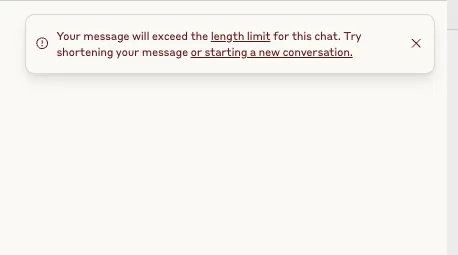
And just like that, my preferred debugging assistant was out of the game.
The Context Window Problem Nobody Talks About
Here’s the thing about AI-assisted debugging that the marketing materials don’t tell you: context windows matter more than almost anything else when you’re troubleshooting real production issues.
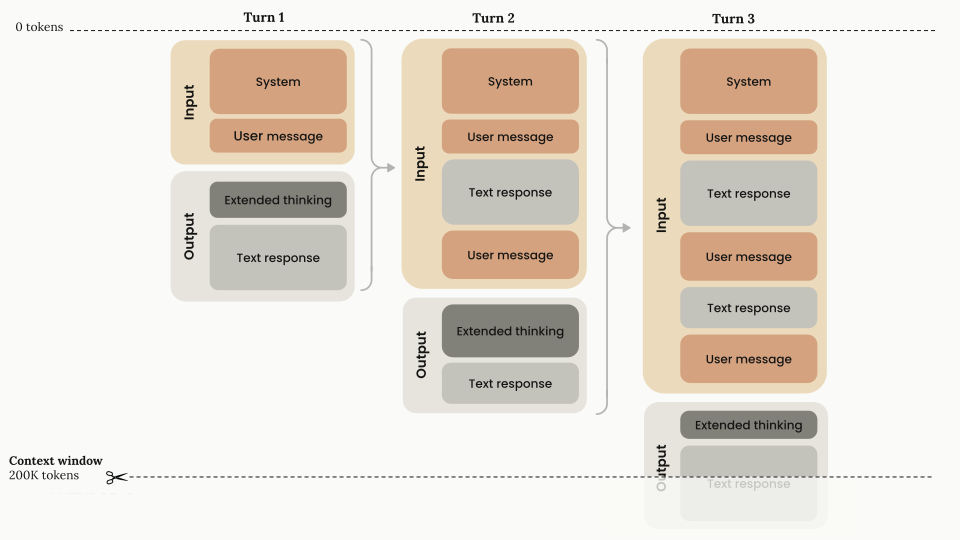
Claude’s web interface operates with a 200K token context window—that’s roughly 150,000 words or about 750 pages of text. While Claude Sonnet 4 and 4.5 support up to 1 million tokens via the API, this feature is currently in beta and only available to organizations in usage tier 4 or those with custom rate limits.
For someone like me, working primarily through claude.ai and building solutions for small business clients, that 200K limit is my reality. And when you’re dealing with log files, that reality hits hard.
What 200K tokens actually means for debugging:
- One complex n8n execution JSON: 30-80KB
- A day’s worth of Docker container logs: 50-200KB
- Multiple API response comparisons: 40-100KB
- Full Vapi call transcripts with metadata: 25-75KB
Do the math. One substantial log file can eat up 25-40% of your available context window before you even ask a question. And here’s where it gets worse: each turn in the conversation includes all the previous content. So that first analysis? It just consumed another chunk. Second question? Now you’re at 60-70% capacity. Third question? The conversation starts breaking down or Claude simply won’t let you continue.
I call this the “1-2 response death spiral.” You paste your logs, get one decent answer, maybe squeeze out a follow-up question, and then the conversation becomes unusable. You’re stuck starting over, losing all that context, and basically doing detective work with amnesia.
My Actual Breaking Point
Let me tell you about the specific situation that made me stop fighting the system and just embrace Gemini for log analysis.
I was debugging an integration between n8n and a client’s CRM system. The workflow was supposed to:
- Fetch new leads from their website form
- Enrich the data with information from multiple APIs
- Check for duplicates against their existing database
- Create or update records in the CRM
- Send confirmation emails
- Update a Google Sheet for reporting
Somewhere in this chain, things were failing intermittently. Not every time—just often enough to be a problem. The kind of bug that makes you question your sanity because you can’t reproduce it consistently.
The n8n execution logs for the failed runs were about 65KB each. I had three failed executions I needed to compare to find the pattern.
My first instinct: Claude. It’s better at reasoning through complex logic, finding subtle patterns, understanding the relationships between different parts of the workflow.
The reality: Claude wouldn’t even let me start the conversation. Three 65KB files? That’s 195KB just for the input, leaving virtually no room for Claude to respond or for me to ask follow-up questions.
I tried the “clever” workarounds:
- Truncating the logs (lost critical context)
- Asking Claude to focus on specific sections (but I didn’t know which sections mattered)
- Breaking it into multiple conversations (lost the ability to compare across executions)
Nothing worked well.
The Gemini Revelation
Out of frustration more than anything, I switched to Gemini. I’d heard about the longer context windows but honestly hadn’t paid much attention because I was comfortable with Claude’s interface and reasoning quality.
I pasted all three execution logs—all 195KB—into a single Gemini conversation with a simple prompt:
“Analyze these three failed n8n workflow executions. Find the common pattern causing the failures. Focus on API responses, data transformations, and error messages.”
Gemini’s 1 million token context window meant it could handle all three logs without breaking a sweat. In practical terms, 1 million tokens equals roughly 50,000 lines of code, 8 average-length novels, or transcripts of over 200 podcast episodes.
[IMAGE: Screenshot of successful Gemini analysis with all three logs]
And it worked. Gemini found the pattern within seconds: the CRM API was occasionally returning a 200 status code but with an error message buried in the response body instead of using proper HTTP error codes. Our error handling was checking status codes but not validating the response structure. Three out of every twenty requests were failing silently.
The whole debugging session took 15 minutes. Without hitting a single context limit. With the ability to ask follow-up questions, request more detail on specific sections, and even paste a fourth log file when I found another edge case.
When to Use What: The Honest Truth
I’m not here to tell you Gemini is better than Claude. That’s not the point, and it’s not true.
What I am telling you is that they’re designed for different things, and pretending otherwise just makes your life harder.
Use Claude when:
- You’re making architecture decisions
- You need nuanced code review
- You’re working through complex logical reasoning
- You’re designing systems or workflows
- Your input is under 50KB
- You need the conversation to stay tightly focused
Use Gemini when:
- You’re analyzing large log files (>50KB)
- You need to compare multiple files side-by-side
- You’re debugging complex multi-step workflows
- You have call transcripts or extensive documentation
- Claude literally won’t let you paste your content
- You need the full context without workarounds
Real-world examples where Gemini excels include analyzing Docker service logs over 500K tokens, with successful tests on log files exceeding 1 million tokens. The tool can proactively identify issues, performance bottlenecks, and security vulnerabilities that might not be immediately apparent.
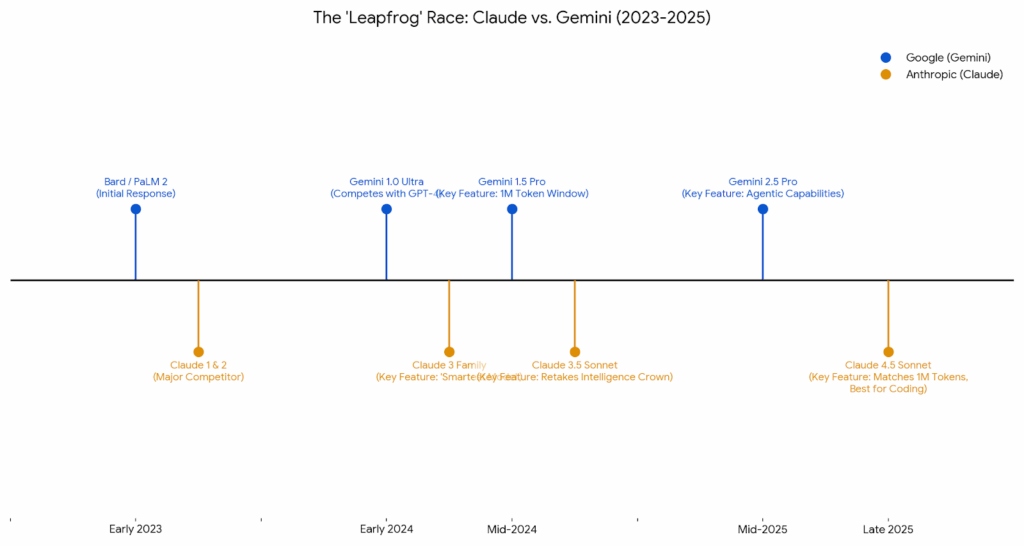
My Current Workflow
Here’s what my actual debugging process looks like now:
For standard development work:
- Use Claude for code review, architecture discussions, and problem-solving
- Keep logs and documentation under 50KB when possible
- Leverage Claude’s superior reasoning for complex logical problems
When I hit a production issue:
- Export the full logs (don’t truncate, don’t summarize)
- Open Gemini in a separate window
- Paste everything with a clear, specific prompt
- Get comprehensive analysis without fighting context limits
- Use follow-up questions freely
- If I need deeper reasoning on a specific finding, I might take that snippet back to Claude
For my n8n workflows specifically:
- Gemini handles execution logs, API debugging, and workflow analysis
- Claude handles the actual workflow design and logic optimization
- Both tools, used for what they’re good at
The Trade-offs (Because Nothing Is Perfect)
Let me be honest about Gemini’s weaknesses, because they’re real:
Gemini can be verbose. Where Claude gives you a focused, concise answer, Gemini sometimes gives you three paragraphs when one would do. You learn to scan for the important parts.
Gemini needs more explicit prompting. Claude is better at inferring what you want. With Gemini, I’ve learned to be very specific: “Focus on error messages and API responses” or “Compare the authentication flow across all three logs.”
Gemini isn’t as good at sustained reasoning. For multi-step logical problems that require holding complex relationships in mind, Claude is still better. Gemini excels at pattern matching and information retrieval, not at building complex mental models.
But here’s the thing: when I’m debugging logs, I don’t need complex reasoning. I need someone to find the needle in the haystack. And for that, Gemini’s massive context window beats Claude’s superior reasoning every single time.
The Real-World Impact
Since adopting this dual-tool approach, my debugging time has dropped significantly. I’m not exaggerating when I say I save 2-3 hours per week just by not fighting with context window limits.
More importantly, I’m not missing critical details anymore. When you truncate logs to fit them into Claude, you’re making a guess about what’s important. Sometimes you guess wrong. With Gemini, I can include everything and let the AI find the patterns I would have missed.
For client work, this matters even more. When something breaks in production, the client doesn’t care about your preferred AI’s context window limits. They care about how fast you can fix it. Being able to paste in complete logs and get accurate analysis in minutes instead of hours changes the economics of support and maintenance.
What’s Next: Automating the Process
The manual copy-paste workflow works, but there’s still friction. I’m currently building scripts to:
- Automatically determine which AI to use based on file size
- Send logs programmatically to Gemini’s API for analysis
- Format the responses for easier reading and integration into my documentation
- Cache common queries using Gemini’s context caching feature (which provides 4x cost reduction for repeated content)
- Integrate with my n8n workflows so failed executions automatically trigger analysis
The goal is to eliminate the context-switching entirely. When something fails, the system should automatically use the right tool for the job without me having to make that decision in the moment.
The Bigger Lesson
This isn’t really about Claude vs Gemini. It’s about understanding that AI tools have different strengths, and trying to force one tool to do everything makes your life harder.
Claude Sonnet 4.5 and Haiku 4.5 feature context awareness, enabling these models to track their remaining context window throughout a conversation. This helps Claude determine how much capacity remains for work and enables more effective execution on long-running tasks. But this doesn’t solve the problem when your input is too large to begin with.
The professional approach isn’t picking a favorite and sticking with it no matter what. It’s building a toolkit where each tool gets used for what it does best.
For me, that means:
- Claude for thinking, reasoning, and design
- Gemini for scale, logs, and comprehensive analysis
- Both for being a better developer who gets unblocked faster
For My Fellow Automation Developers
If you’re building in n8n, working with APIs, managing Docker containers, or doing anything that generates substantial logs, you will hit this problem. Not if—when.
Save yourself the frustration I went through:
- Stop trying to make Claude handle large logs on the web interface. It’s not designed for it, and you’re just fighting the tool.
- Set up a Gemini account if you haven’t already. You don’t need to abandon Claude; you just need another tool in your kit.
- Create a simple decision matrix for yourself. Mine is literally: “Is this over 50KB? Use Gemini. Do I need reasoning? Use Claude.”
- Keep both windows open when you’re debugging. Use the right tool for each part of the process.
- Don’t feel guilty about using multiple AIs. You wouldn’t use a screwdriver to hammer nails. Different tools for different jobs.
The context window problem is real, it’s not going away, and working around it is just part of being a professional developer in 2025. The sooner you accept that and build it into your workflow, the faster you’ll solve problems and the happier your clients will be.
What’s your experience with context window limits? Have you found situations where Gemini (or another model) works better than Claude? I’d love to hear about your workflows and what you’ve learned.
And if you’re interested in the automation scripts I’m building for this, let me know in the comments—I’m planning to open-source them once they’re production-ready.
Technical Note: API vs. Web Interface
It’s worth noting that Claude’s API offers different capabilities than the web interface. The 1 million token context window is available via API for Claude Sonnet 4 and 4.5, but requires usage tier 4 or custom rate limits, and is currently in public beta. Requests exceeding 200K tokens are automatically charged at premium rates—2x for input tokens and 1.5x for output tokens.
For most developers working through claude.ai and building solutions for small to medium-sized businesses, the 200K limit remains the practical reality. The API pricing and tier requirements put the extended context window out of reach for many use cases.
Quick Reference: Log Size Guide
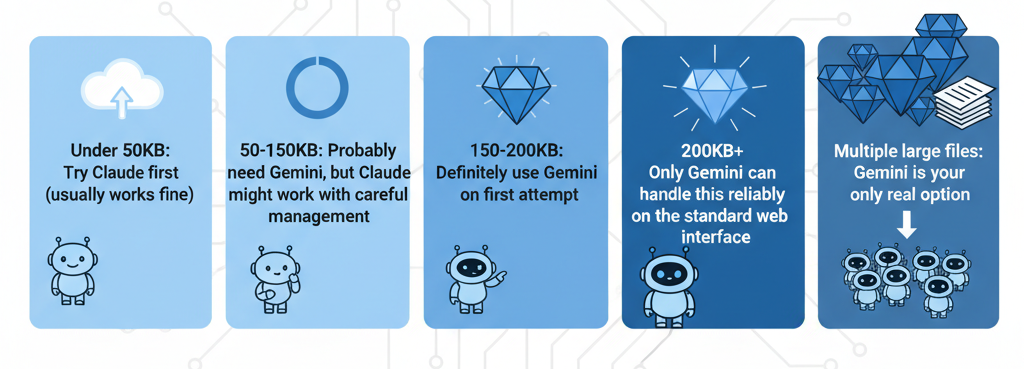
- Under 50KB: Try Claude first (usually works fine)
- 50-150KB: Probably need Gemini, but Claude might work with careful management
- 150-200KB: Definitely use Gemini on first attempt
- 200KB+: Only Gemini can handle this reliably on the standard web interface
- Multiple large files: Gemini is your only real option