
Can You Trust an AI Spending Limit? What My Gateway Test Showed
A small gateway test stopped repeated requests without cutting off another key. The allowance still overshot. Here’s how I’d turn that result into a buying decision.
 Collin GatesSep 14, 20268 min read
I set a five-cent spending limit in an AI gateway. The test's recorded spending reached 5.2 cents before it stopped accepting requests.
Those were deliberately artificial prices, not a surprise charge on a customer's account. I was testing real gateway software against a simulated AI provider to answer a practical question: could I stop one stream of repeated requests without cutting off another?
The answer was yes in this small test. The allowance was useful, but it wasn't an exact ceiling. That distinction matters if you're buying an AI tool because its settings include a field called “budget.”
A budget setting can mean several different things
Before adding another service, I'd want to know what the business actually needs it to do. Seeing which application generated a bill is different from preventing that application from making its next request.
An AI gateway sits between an application and the model provider. Instead of each application calling the provider directly, requests pass through a shared service that can apply rules and record usage. My experiment used LiteLLM, but the decision starts before choosing that software.
If your concern is knowing where the bill comes from, you need a record of which application spent what. If only certain applications should use an expensive model, you need rules about who can access it. If an application must stop spending after using its allowance, you need a rule that actually refuses further requests. Ask when that rule takes effect, not just whether the product has it.
These requirements can overlap without being interchangeable. According to AWS's documentation, AWS Budgets information updates up to three times a day, typically eight to twelve hours after the previous update. It supports alerts and optional actions, but billing delays can allow additional spending before notification. I wouldn't treat an alert as proof that the next model request will be refused.
This is for applications that send their AI requests through the gateway. It isn't automatically a spending control for every employee's ChatGPT subscription or browser session.
One application's limit doesn't have to stop everyone else
The useful result wasn't the tiny dollar amount. It was whether one application reaching its limit would stop another application that still had room to work.
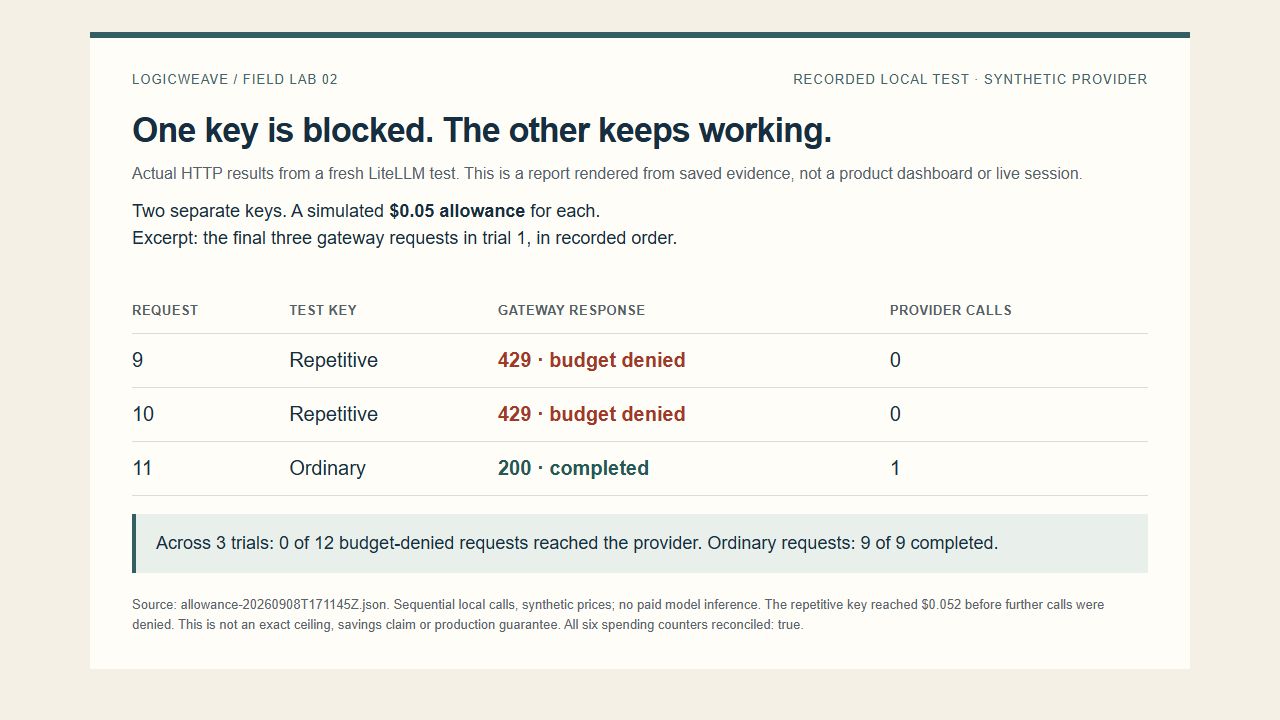
To represent separate applications, I created two access keys: credentials the gateway could track independently. One made three requests; the other attempted eight. Each received an artificial $0.05 allowance, and each successful response carried an artificial $0.013 cost. I ran the same request schedule directly against the simulated provider, then through the gateway.
The results were identical across three trials:
| Per trial | Direct, without a spending rule | Through the gateway |
|---|---|---|
| Ordinary key: three requests | Three completed | Three completed |
| Repetitive key: eight requests | Eight completed | Four completed; four rejected |
| Repetitive key's artificial spend | $0.104 | $0.052 |
The three-request key could still make a request after the other key was blocked. Across all three trials, none of the twelve refused requests reached the provider. I also waited for the spending records to finish saving and checked that each key's total matched its individual request costs. The recorded results and method are public.
That is the behavior I'd want to check before giving different applications their own allowances. It doesn't demonstrate a 50% saving: I deliberately wrote a script that kept asking. The gateway would stop useful work too if it reached the same limit. It counts consumption, not business value.
I used new keys for each trial, but all three ran in the same local setup, one request at a time. This wasn't a test of simultaneous employees or an AI agent deciding to run away. It shows that the rule worked in this setup, not that it's ready for every workload.
An allowance is not automatically an exact ceiling
The repetitive key completed four calls at $0.013 each, reaching $0.052 against its $0.05 allowance. Further calls were then refused. The overshoot was four percent of this chosen limit; it is not a general upper bound for the product.
For an owner, the follow-up question is straightforward: what happens when a request begins near the limit? I'd want the answer to include work already underway, simultaneous requests, different model prices and the point at which usage becomes recorded spending. A budget field alone doesn't answer those questions.
I'd also ask what happens after a restart. In an earlier local test, individual request records showed spending that was missing from some keys' saved totals after I restarted the gateway immediately. A separate test that waited before restarting kept the totals correct. I haven't established why they differed, and the later allowance test didn't settle it. The research record preserves both outcomes.
The gateway did stop further spending in the allowance test. I wouldn't turn that result into a promise that a bill can never exceed a stated amount. If that's what your business needs, ask the supplier to demonstrate it under those conditions.
Existing controls deserve the first look
For the direct comparison, I deliberately left out a spending rule. That let me check what changed when I added one. It doesn't mean you need a gateway to have any control at all.
Amazon Bedrock supports access policies that restrict who can do what and which resources they can use. If you mainly need to decide which applications can use which models, start by checking those existing permissions. This is a documented option, not something I tested head-to-head against the gateway's access rules. I explored the related authorization problem in Why AI agent permissions fail when every tool gets the same access.
Direct access also leaves you with one less service and database to keep running. That matters if the controls you already have solve the problem. I wouldn't add a gateway just to make an architecture diagram look more complete.
A gateway becomes worth evaluating when something specific is missing: perhaps you need one place to manage allowances for several applications. But those applications must actually go through it. If they can still call the provider directly with unrestricted credentials, the gateway's rules won't govern those calls. Preventing that requires a separate access design, which I didn't test here.
Someone still has to run the control
My allowance test needed a running gateway and a database to store its records. LiteLLM documents that database requirement. If you run it yourself, someone needs to handle updates, monitor failures and decide how work continues during an outage.
I put roughly two hours into researching this, by my estimate. It wasn't a two-hour production installation. Researching the behavior and taking responsibility for a live system are different jobs.
To make the ongoing decision concrete, I priced a hypothetical light-use AWS setup: two gateway containers, a small database, a load balancer and private-network access. It comes to roughly $225 a month, including a $25 planning allowance for variable services such as logs, backups and data transfer. That is before model usage, paid support and taxes. It isn't a deployed bill or a high-availability recommendation; the database in this example still runs in one availability zone. The AWS compute, load-balancer and networking prices are starting points, not a guarantee of your bill.
Add an assumed three hours of monthly upkeep at $100 an hour and the overhead becomes about $525 a month. I haven't measured that maintenance effort, so treat it as a scenario. If your AI usage otherwise stayed at $1,000 a month, you'd be looking at approximately $1,225 in infrastructure and model charges, plus $300 of valued upkeep, before the other exclusions and initial implementation.
This isn't the minimum price of a gateway. A smaller installation can cost less, with different reliability tradeoffs. For a savings-only justification, this scenario sets a fairly demanding target:
| Existing monthly AI bill | Reduction needed to cover $525 overhead |
|---|---|
| $500 | More than the whole bill; savings alone cannot cover it |
| $2,500 | 21% |
| $10,000 | 5.25% |
Those are break-even requirements, not savings my experiment demonstrated. A spending rule can stop useful work too. If the value is less administration instead, count the administrative time the gateway removes, subtract the time spent maintaining it, and don't count the same hours twice. Initial implementation still has to be recovered. I haven't demonstrated a completed coding workflow through this setup, so these economics are a way to assess a proposal, not a recommendation to deploy mine.
I'd keep direct access when its existing permissions and reporting do the job. I'd evaluate running a gateway when I need a shared rule badly enough to assign an owner and pay for its upkeep. If I need that rule but don't want to run the service, I'd investigate a managed option and check which plan includes it. I haven't trialed a managed alternative, so I'm not naming a winner.
Before choosing, write down one testable requirement: “When this application's allowance is consumed, further calls must stop, other applications must continue, and the recorded usage must survive a restart.” Then ask your current setup or proposed supplier to show you that behavior, including what happens at the limit.