I needed my AI agents to remember things between conversations. Not just the current task — the preferences, the patterns, the “we tried that already and it broke” kind of knowledge that makes the difference between a useful assistant and one that starts from zero every time.
Claude Code has a built-in memory system. mem0 is an external memory service that connects via MCP. I tested both against a real production content pipeline to see which one actually works. The answer is more nuanced than I expected.
Claude Code Memory: It’s Just Files
Claude Code’s memory system is surprisingly simple. It’s markdown files in a project-specific directory on disk. No database, no API, no service to manage.
There are two layers. MEMORY.md is an index file that loads into Claude’s context at the start of every conversation. It tells Claude what it knows about and where to find details. Individual memory files — things like clickup_setup.md or content_agents.md — are linked from the index but only read when the conversation is relevant.
Think of it like a table of contents that’s always open, with chapters pulled from the shelf on demand. The index stays under 200 lines because it consumes context window on every message. The linked files can be as detailed as you want.
Memory files use frontmatter with types — user for preferences and expertise, feedback for corrections you’ve given, project for ongoing work context, reference for pointers to external systems. Claude uses these to decide what’s relevant.
The strengths are obvious: it’s always available, free, fast, structured however you want, and you can browse and edit the files in any text editor. The limitation is equally obvious — no semantic search. Claude has to read the index and guess which file to open. There’s no “search by meaning” across all memories.
mem0: Semantic Search With a Catch
mem0 connects to Claude Code via MCP (Model Context Protocol) and provides a managed memory store with semantic search. You store memories, and later you can search them by meaning rather than filename.
The tool set is straightforward: add_memory, search_memories, get_memories, update_memory, delete_memory. You tag memories with a user_id and optional metadata for filtered retrieval.
The catch is how mem0 processes what you give it.

I stored 10 detailed, paragraph-length memories covering brand strategy, case studies, LinkedIn post formats, technical deployment patterns, and client testimonials. mem0 broke them into 15 smaller atomic facts. Dense paragraphs got split into individual statements. A lot of detail was dropped entirely.
What survived: “Collin Gates is an AI and automation freelancer on Upwork.” What got lost: detailed LinkedIn post format specifications, step-by-step MCP deployment patterns, ClickUp workflow configurations, client testimonial specifics.
mem0 is designed for facts and preferences. “Collin prefers AWS” fits perfectly. “Here are the 3 critical requirements for Azure MCP deployment with code examples” does not.
The Search Query Discovery
This was the most useful thing I learned. Query phrasing matters dramatically for mem0’s semantic search.
Natural language questions work significantly better than keyword dumps. When I searched “how should LogicWeave content sound and feel, what is the writing voice” — the brand voice memory ranked #1 with a 0.9 relevance score.
When I tried keyword-style: “brand voice personality tone conversational honest self-deprecating” — the brand voice memory still ranked #1 but an irrelevant n8n migration case study jumped to #2 at 0.82, pushing the actual values memory down to #6.
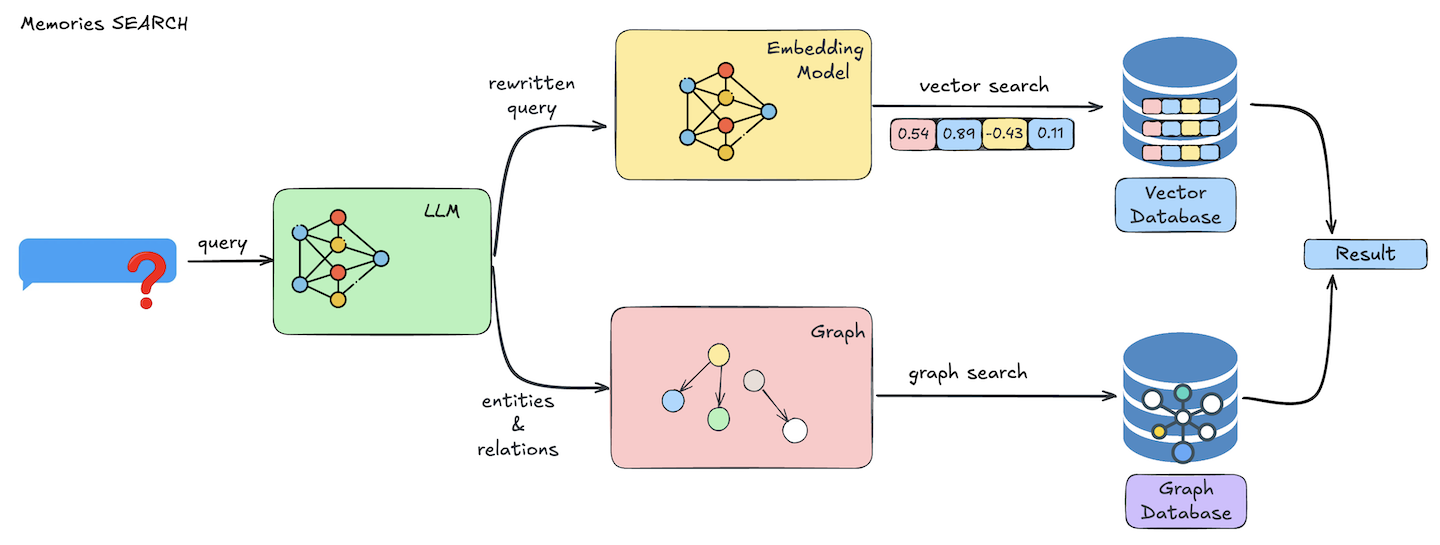
You can also tag memories with custom metadata and filter by it — like {"category": "brand_voice"}. That gives exact matches. But in a new conversation you won’t know what categories exist unless you documented them somewhere, which brings you right back to needing a file-based system to track what’s in your semantic system.
Where Each Actually Fits
I tested both against my actual content production pipeline that already uses multiple knowledge sources. Google Drive holds brand docs, read fresh via CLI every time. Supabase with pgvector archives published posts with embeddings for semantic search. WordPress is the publishing destination. Claude memory handles project config and workflow documentation.
In this setup, mem0 is largely redundant for what I was trying to use it for. Google Docs already handles brand knowledge and stays current as the source of truth. Supabase already handles “understand my writing style” with vector search over full blog posts. Claude memory handles session-to-session context.
Where mem0 earns its place is different from what I initially expected. It’s not a replacement for any of those — it’s for cross-agent institutional memory. Quick facts discovered during working sessions that don’t belong in a Google Doc or a blog post. Things like “don’t use that headline style” or “the client prefers bullet points.” Preferences and corrections that should be available to any tool, not just Claude Code.
The Comparison That Matters
Claude Code memory is a file system. You control every byte, it’s reliable, and it’s free. The tradeoff is no semantic search and single-tool access.
mem0 is an opinion engine. It extracts facts from what you give it and makes them searchable by meaning. The tradeoff is lossy storage — you can’t use it for reference documentation.
Neither replaces a proper vector database. If you need full document fidelity with semantic search — full blog posts, case studies, detailed technical docs — that’s what pgvector or a dedicated vector store is built for.
The best memory system depends on your retrieval pattern. Know exactly what you’re looking for? Claude memory files. Need to search by meaning? mem0 or pgvector. Multiple agents need the same facts? mem0. Need complete documents preserved? pgvector.
They’re complementary, not competing. I’m keeping both — Claude memory for the structured reference docs and always-on context, mem0 for the searchable cross-agent facts that accumulate during working sessions.
FAQ
Does Claude Code memory persist between conversations?
Yes. MEMORY.md loads automatically at the start of every conversation in the project. Individual memory files are read on-demand when relevant.
Can mem0 store full documents?
Not effectively. mem0 auto-extracts atomic facts from your input and may drop detail. Use it for preferences and key facts, not reference documentation.
Do I need both Claude Code memory and mem0?
Depends on your setup. If you only use Claude Code, the built-in memory is probably enough. mem0 adds value when multiple agents or tools need shared memory, or when you need semantic search across accumulated knowledge.
How should I query mem0 for best results?
Use natural language questions like “what is the brand voice” rather than keyword lists. Semantic search scores are significantly better with question-style phrasing.