
Claude Code Agent View Ships a Kanban Data Model — But No Board
Claude Code Agent View landed in 2.1.139 with the task data model on disk — but no board. Here’s the 50-line script that renders the kanban.
 Collin GatesMay 16, 20267 min read
I opened ~/.claude/jobs/ on my machine this morning. Claude Code Agent View shipped in 2.1.139 last week and I’d already updated to 2.1.142 without reading the changelog carefully. The folder contained four JSON files I’d never looked at — one per active background session. Each file had five fields that, if you squint, are a kanban card: a status, an auto-generated title, the original ask, an activity indicator, and a count of work in the queue. Anthropic shipped the task data model. They didn’t ship the board.
If you’re running Claude Code 2.1.139+ and you’ve ever wished your agents felt more like a Linear sprint and less like a chat window, this is the unannounced foundation. This post walks through what’s actually on disk, the gap between data and dashboard, and a 50-line script that renders the kanban Anthropic forgot to ship.

What Claude Code Agent View Actually Shipped in 2.1.139
Three features landed in the May 11, 2026 release:
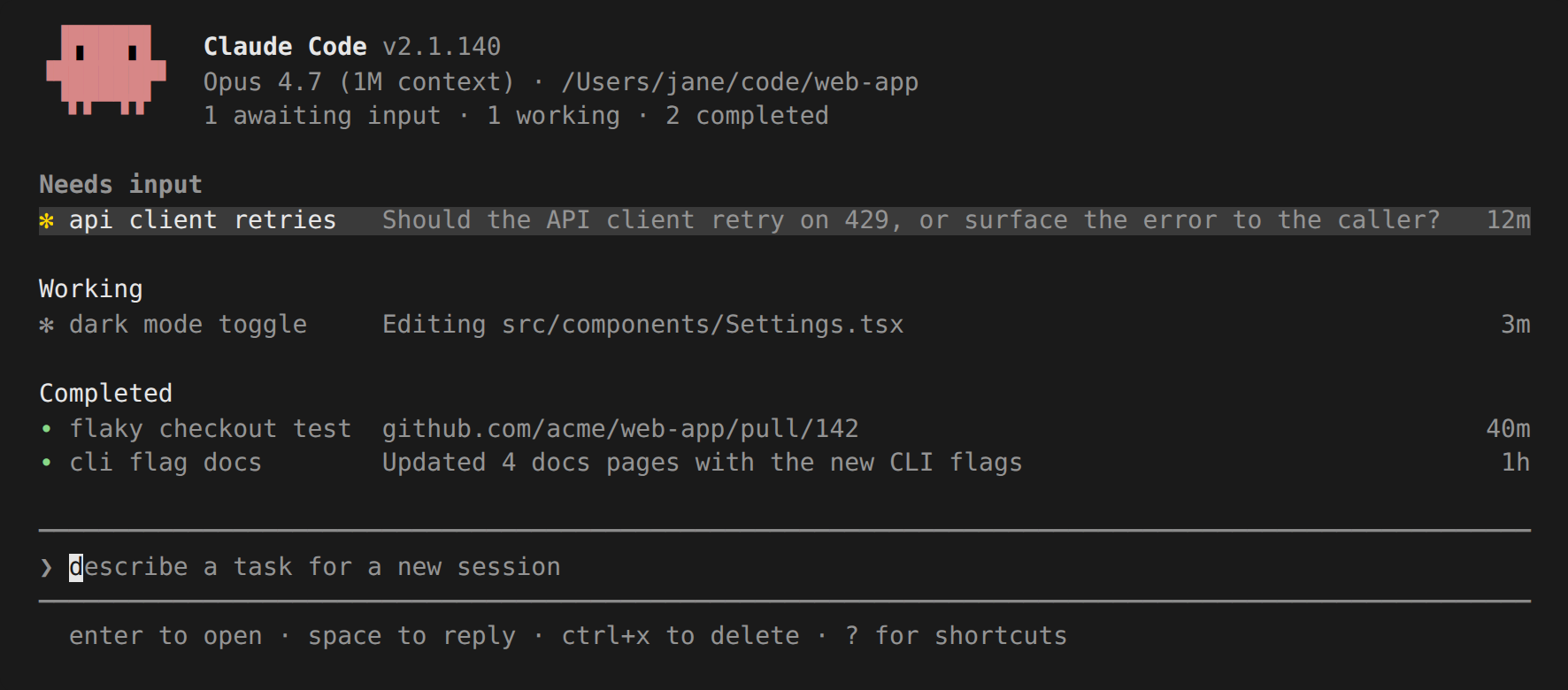
- Agent View — a terminal TUI for monitoring background sessions across all your projects. Run
claude agents. Sessions are grouped by state,Spacepeeks,Enterattaches,Ctrl+Tpins. - /goal — a session-scoped wrapper around a prompt-based Stop hook. Set a condition, a Haiku-class evaluator checks after each turn, the session loops until the condition holds. Useful for “run until all tests pass.”
- System Prompt Compaction Improvement — the changelog reads “compaction prompt now asks the model to preserve sensitive user instructions.” That’s the whole feature. One line. Skip it.
The Agent View is the headline. Underneath it is a real architectural shift: Claude Code now runs a long-lived supervisor daemon at ~/.claude/daemon/. Each background session becomes a worker process — its own pid, its own cwd, its own pair of unix sockets — registered in ~/.claude/daemon/roster.json. The TUI is just a renderer on top of that data.
Here’s my own roster snippet captured five minutes ago, lightly redacted:
{
  "proto": 1,
  "supervisorPid": 14015,
  "workers": {
    "1c38a8c3": {
      "pid": 14958,
      "cliVersion": "2.1.142",
      "cwd": "/mnt/c/Users/Admin/Documents/MyAssistant",
      "startedAt": 1778866485823
    }
  }
}
Supervisor pid 14015 is managing one worker. That worker is the Claude Code session I’m writing this post in. It’s been alive for about three hours. The daemon would keep it running even if I closed the terminal.
The Task Model Lives at ~/.claude/jobs/state.json
Each worker has its own state file. Mine, redacted:
{
  "state": "done",
  "tempo": "active",
  "inFlight": { "tasks": 0, "queued": 0, "kinds": [] },
  "name": "chrome-devtools browser automation",
  "nameSource": "auto",
  "intent": "what tools do you have to open a browser and check my linkedin?",
  "worktreePath": ".claude/worktrees/linkedin-sandbox",
  "worktreeBranch": "worktree-linkedin-sandbox",
  "cliVersion": "2.1.142"
}
Read it as a kanban card and the mapping is mechanical:
- Column / status →
state - Activity indicator →
tempo - Sub-tasks waiting →
inFlight.queued - Card title →
name(auto-generated from intent) - Description →
intent(the original user prompt) - Branch / linked artifact →
worktreeBranch
Three things stand out. First, name is auto-generated by a small model based on the intent — nameSource: "auto" means I never typed “chrome-devtools browser automation.” It read my opening prompt and summarized. Useful, but stale by hour three — this session is now a blog post draft, not browser automation.
Second, worktreePath is automatic too. Claude Code creates a git worktree per session before any file edit, then registers it in the state. The dashboard half a decade of agent-tool vendors have promised — “see what the agent is touching” — is sitting in a single string field.
Third, state is an enum. The Anthropic docs name four buckets in Agent View’s grouping (Pinned / Needs input / Working / Completed), but the value in this file is just done. The full enum is undocumented. Reading 12 sessions worth of state.json files on my machine, I’ve seen done, working, and pending. There’s almost certainly a needs_input value too, hiding behind sessions that have stopped to ask a question.
A 50-Line Script That Renders the Kanban
Once you see the shape, the script writes itself. This Python program walks ~/.claude/jobs/, groups by state, and prints a kanban to the terminal:
#!/usr/bin/env python3
"""Render a kanban of Claude Code background sessions."""
import json, pathlib, shutil
from collections import defaultdict

JOBS = pathlib.Path.home() / ".claude" / "jobs"
COLS = ["pending", "working", "needs_input", "done"]
LABELS = {"pending": "TO DO", "working": "IN PROGRESS",
          "needs_input": "NEEDS APPROVAL", "done": "DONE"}

def load(job_dir):
    f = job_dir / "state.json"
    if not f.exists(): return None
    try: return json.loads(f.read_text())
    except: return None

buckets = defaultdict(list)
for job in JOBS.iterdir():
    if not job.is_dir(): continue
    s = load(job)
    if s: buckets[s.get("state", "pending")].append(s)

width = max(30, shutil.get_terminal_size().columns // 4 - 2)
print("  ".join(f"{LABELS[c]:<{width}}" for c in COLS))
print("  ".join("\u2500" * width for _ in COLS))

max_rows = max((len(buckets[c]) for c in COLS), default=0)
for row in range(max_rows):
    line = []
    for col in COLS:
        if row < len(buckets[col]):
            s = buckets[col][row]
            title = (s.get("name") or "untitled")[:width-4]
            queued = s.get("inFlight", {}).get("queued", 0)
            tag = f" ({queued}q)" if queued else ""
            line.append(f"\u2022 {title}{tag}".ljust(width))
        else:
            line.append(" " * width)
    print("  ".join(line))
Save it as ~/bin/cck, mark executable, and run. You get a four-column terminal kanban of every Claude Code session on your machine:
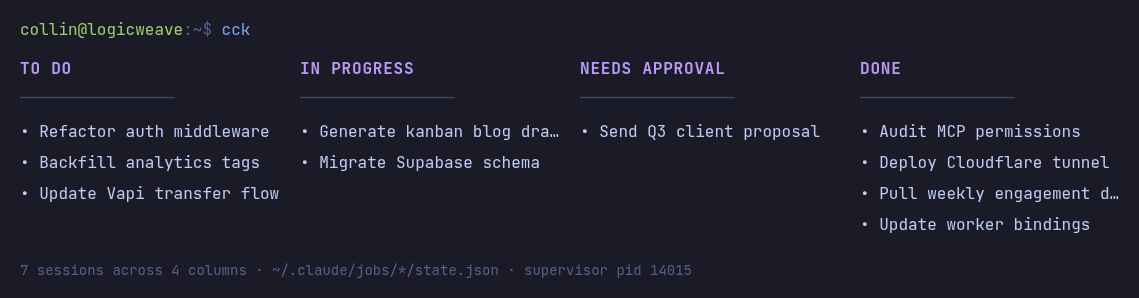
A fancier version is a 200-line web app that polls every two seconds and renders columns in HTML. A nicer version pipes to a tray-icon status indicator. A team version watches a shared volume of jobs and renders to a browser. All of those are weekend projects on top of this primitive. The hard part — the structured state — Anthropic already wrote.
What’s Still Missing From the Data Model
The model has gaps. Honest list:
pins.jsonis referenced in the docs but doesn’t exist on disk. Pinning is a documented Agent View feature; the persistence layer isn’t wired up yet on 2.1.142. Pinning works in-session but doesn’t survive a restart.- No web UI. The TUI is great for solo work; teams will want a browser-rendered board with shared state. That’s not on the public roadmap.
- The “Needs Approval” workflow primitive is implied, not built. A session can stop and ask the user a question, and that surfaces in Agent View. But there’s no first-class “human-in-the-loop approval gate” you can set up in advance. You can simulate it with a
/goalcondition that says “stop and ask before deploying,” but it isn’t as clean as a kanban move-to-column. - Auto-naming is okay, not great. My session was named “chrome-devtools browser automation” three hours ago. It’s been doing entirely different work for the last two. There’s no re-naming as intent evolves.
- The schema isn’t documented. Half of what I described above is from reading source files that ship with the binary, not Anthropic docs. That’ll change when this graduates from research preview to GA.
Why This Matters for Consultants Building Agent Stacks
If you run a Claude-based agent practice, the monitoring question used to be “do I build my own observability layer or wait for Anthropic?” That’s a real engineering cost — a Postgres table for run history, a webhook listener, a frontend, a permissions story. Most teams I’ve worked with deferred it indefinitely.
Claude Code Agent View collapsed the answer. Your monitoring layer’s data source is ~/.claude/jobs/ on each machine running the agent. Aggregate across a fleet by mounting that directory to a shared volume or syncing the JSON files through any rsync-shaped pipeline — or skip the daemon entirely with a self-hosted OpenClaw deploy when you want full control of the agent runtime. The kanban view, the per-session detail page, the post-hoc audit — all of those become small read-only consumers of one structured directory.
That’s not a product. It’s a primitive. The product is whoever ships the team-shareable web view first. Right now nobody has. If you want to see how Anthropic’s prior agent infrastructure played out commercially, the Claude Design rollout is a useful precedent — the pattern is data-first, UI-later, and the consultancies that build the UI layer eat well.
FAQ
Where exactly does Claude Code Agent View store session state?
On disk, in ~/.claude/jobs/<short-id>/state.json for each session. The supervisor process at ~/.claude/daemon/roster.json tracks which sessions are alive. Both are plain JSON; no database, no API call required to read them.
Can I read state.json files from background Claude Code sessions in real time?
Yes — the daemon writes updates atomically, so polling once per second or watching the directory with inotify both work. Don’t open the file for write yourself; that’s the daemon’s job and concurrent writes will corrupt the state.
Does Claude Code Agent View work the same way on macOS, Linux, and WSL2?
The daemon and JSON files are identical across platforms. Socket paths live in /tmp/cc-daemon-<uid>/ on Linux and the equivalent temp dir on macOS. WSL2 works the same as native Linux.